Multi-channel ad platforms: the 2026 buyer's guide
. By Ads Daddy.

TL;DR:
- A multi-channel ad platform consolidates management and reporting across major advertising channels to improve efficiency and accuracy. It helps teams automate budgets, normalize metrics, and coordinate campaigns, especially for those spending over $30K per month across multiple channels. Proper evaluation requires secure integration, robust normalisation, and guardrails to prevent automation errors.
If your team is running ads across three or more channels and still juggling separate tabs, mismatched metrics, and manual budget shifts, you need a multi-channel ad platform. These tools act as a command centre on top of your native ad managers, letting you compare ROAS across Google, Meta, LinkedIn, and more from one dashboard, automate budget rules, and launch campaigns at scale without multiplying errors.
Three signals you need one right now:
- You're managing 3+ paid channels and switching tabs to reconcile numbers that never quite match
- Your ROAS varies wildly by channel but you can't pinpoint why because attribution windows differ
- Your team spends more than a few hours a week on manual reporting or budget adjustments
TL;DR next steps:
- Run a 30-day proof of concept (POC) on your two highest-spend channels
- Use the vendor checklist in Section 8 to score shortlisted tools
- Expect SaaS costs depending on ad spend and team size, varying from more affordable to higher pricing tiers (see Section 9 for cost considerations)
Table of Contents
- What are multi-channel ad platforms and who actually needs them?
- Core features to prioritise when evaluating multi-channel ad platforms
- What types of multi-channel solutions suit your team?
- How do multi-channel platforms actually work under the hood?
- What's the actual ROI of using a multi-channel ad platform?
- What problems do these platforms actually solve — and what they don't
- How to evaluate vendors: the scoring matrix and questions to ask
- What does implementation actually cost and how long does it take?
- Adsdaddy's operational playbook for running cross-channel campaigns
- What's the right call for your team right now?
- How does a multi-channel platform fit into your existing martech stack?
- Key takeaways
- The honest truth about multi-channel platforms in Australia
- Adsdaddy runs your multi-channel campaigns so you don't have to
- Useful sources and further reading
- FAQ
What are multi-channel ad platforms and who actually needs them?
A multi-channel ad platform is an orchestration layer that sits on top of native ad managers like Google Ads, Meta Ads Manager, LinkedIn Campaign Manager, and Microsoft Advertising. It does not replace those tools. Think of it like a sports coach watching every player at once rather than being one of the players. The native managers still execute the bids and serve the ads. The platform pulls normalised data from each, applies rules, and gives you a single place to act.
The industry term you'll see in procurement documents is "cross-channel advertising management platform" or sometimes "omnichannel campaign management software." Both describe the same thing: a layer that connects your digital ad networks, normalises the metrics, and lets you move fast.
Primary use cases where these platforms deliver real value:
- Unified reporting: One dashboard showing CPA, ROAS, and spend across every channel with consistent metric definitions
- Bulk campaign launch: Push a new campaign to five channels simultaneously without copy-pasting settings
- Rules-based budget shifting: Automatically move budget from an underperforming channel to an overperforming one when ROAS thresholds are hit
- Creative variant management: Manage multiple ad formats and creative versions across channels without losing track
- Cross-account agency workflows: Manage dozens of client accounts from one login with proper role separation
The teams that benefit most are in-house growth squads running multi-platform marketing at scale, performance agencies managing multiple client accounts, and e-commerce retailers running seasonal campaigns across Google Shopping, Meta, and TikTok simultaneously. If you're a solo operator running one channel, you don't need this yet. If you're a mid-market DTC brand spending $30K+ per month across channels, you almost certainly do.
For a deeper look at why multi-platform campaigns deliver better reach and lower blended CPA, that's worth a read before you start your vendor shortlist.
Core features to prioritise when evaluating multi-channel ad platforms
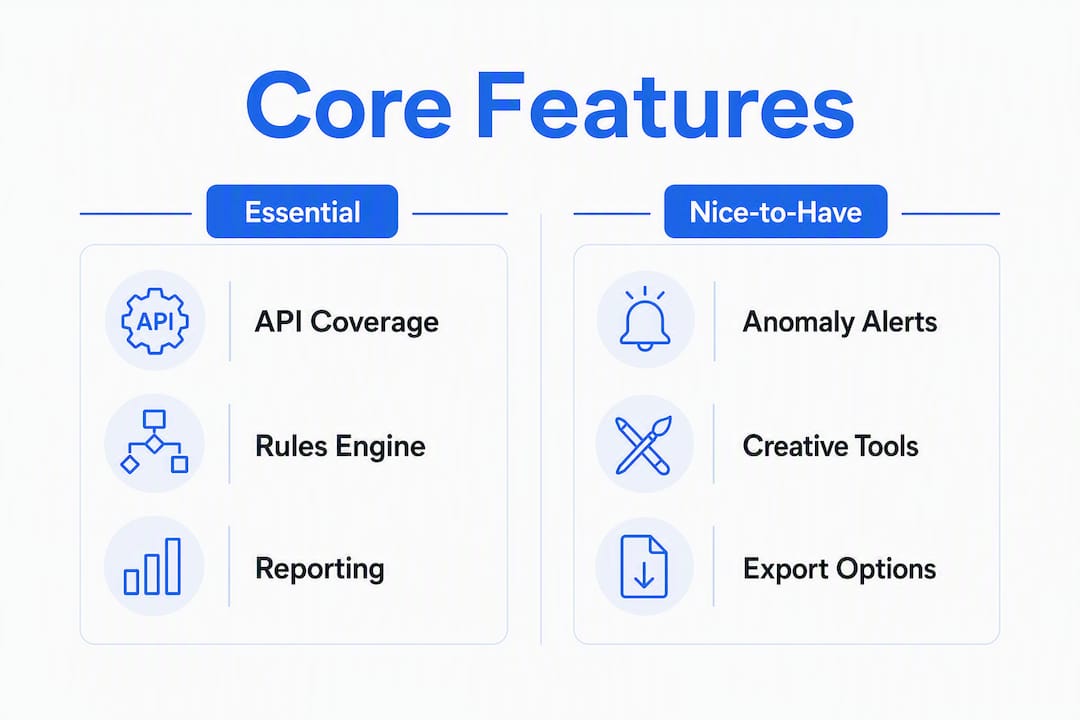
Not all platforms are built the same. Some are strong on reporting but weak on automation. Others have a powerful rules engine but limited integrations. Here's what actually matters, ranked by impact on your day-to-day operations.
Integrations and API coverage
Your platform must connect natively to every channel in your current stack. That means Google Ads, Meta, LinkedIn, Microsoft Advertising, TikTok, and ideally Pinterest and Snapchat if you use them. Check whether the integration is read-only (reporting only) or write-access (can push changes). Write-access is what enables automation. Also confirm API call frequency — some platforms only sync data every 24 hours, which makes real-time budget decisions impossible.
Data normalisation and attribution windows
This is the feature most buyers underestimate. Every platform defines conversions differently. Google might count a view-through conversion at 30 days. Meta might count a click-through at 7 days. If your cross-channel dashboard doesn't normalise these windows to a consistent definition, you're comparing apples to motorbikes. A proper normalisation layer converts CPM variations, aligns attribution windows, and gives you a true apples-to-apples ROAS comparison. Without it, your budget decisions are built on bad data.
Rules engine and autonomous budget-shifting
A rules engine lets you set conditions like "if channel ROAS drops below 2.0 for 48 hours, pause spend and alert the team." The best engines execute safely: they require minimum conversion thresholds before acting, log every change, and support a rollback mechanism. Be sceptical of platforms that automate budget shifts without guardrails. Automation without guardrails is just a faster way to burn budget.
Bulk launch and creative variant management
If launching a campaign to five channels takes your team a full day of manual setup, a bulk launch tool cuts that to under an hour. Look for the ability to map creative assets to channel-specific formats automatically, and to manage multiple variants without creating separate workflows for each.

Pro Tip: Always test bulk launch with a small dummy campaign before going live. Mapping errors in bulk uploads can push incorrect bids or budgets to live accounts before anyone notices.
Access controls and security
Agencies especially need this. OAuth-based account linking means you never share master credentials with a third-party tool. Role-based permissions let you give a client read-only access while your team retains write access. Demand both in writing before signing a contract.
Reporting, dashboards, and exportability
Your reporting layer needs CSV export at minimum, and ideally native connectors to Looker Studio, Power BI, or Tableau. If your analytics team can't pull raw data into their own BI environment, the platform becomes a reporting silo rather than a reporting solution.

Audit logs, alerts, and anomaly detection
Audit logs tell you who changed what and when. Anomaly detection flags a sudden spike in CPM or a drop in conversion rate before it becomes a budget leak. These aren't nice-to-haves for agencies or large teams. They're the difference between catching a problem in two hours versus two days.
Nice-to-haves: AI-assisted budget recommendations, creative automation (dynamic ad assembly), CDP connectors for first-party data activation, and native e-commerce integrations with Shopify or WooCommerce.
What types of multi-channel solutions suit your team?
The category you choose matters as much as the specific tool. Here's how the main solution types stack up:
| Category | Best for | Core strength | Trade-off | Cost structure |
|---|---|---|---|---|
| Orchestration layer | Agencies, mid-market growth teams | Cross-channel rules, bulk ops, unified reporting | Limited programmatic inventory access | Seat-based or spend-based |
| DSP (Demand-Side Platform) | Enterprise teams, programmatic buyers | Programmatic inventory, bid optimisation | Less suited to social/search channel management | CPM or spend-based |
| Native multi-account manager | Small agencies, single-channel specialists | Deep native feature access | No true cross-channel normalisation | Usually free or low-cost |
| CDP + ad ops stack | Enterprise, first-party data-heavy brands | First-party data activation, audience building | High implementation complexity and cost | Seat-based, often enterprise pricing |
Orchestration layers are the most practical starting point for most Australian marketing teams. They connect to your existing channels without replacing them, and the implementation lift is manageable.
DSPs make sense if a significant portion of your spend is in programmatic display or video inventory. They're less useful if most of your budget sits in Google Search and Meta.
Native multi-account managers (like Google's MCC or Meta Business Suite) are free and powerful within their own ecosystem, but they can't compare performance across ecosystems. That's their hard limit.
CDP + ad ops stacks are for teams with mature first-party data programmes and the technical resources to manage complex integrations. For most mid-market Australian businesses, this is overkill until you've nailed the basics.
For e-commerce teams specifically, a multichannel ads strategy that layers an orchestration platform over your existing channels is usually the fastest path to measurable ROAS improvement.
How do multi-channel platforms actually work under the hood?
Understanding the plumbing helps you ask better questions during vendor demos and spot integration risks before they become live problems.
The data flow looks like this:
- API connectors pull raw campaign data from each channel (impressions, clicks, spend, conversions) on a defined cadence — hourly, every 6 hours, or daily depending on the platform
- Normalisation layer converts platform-specific metrics into consistent definitions: aligns attribution windows, standardises conversion event names, and resolves currency differences for multi-market accounts
- Rules engine evaluates conditions against the normalised data and either alerts the team or executes a change (pause, budget shift, bid adjustment) based on pre-set logic
- Execution layer pushes approved changes back to the native ad managers via write-access API calls
- Reporting and BI layer surfaces the normalised data in dashboards and exports it to connected BI tools
Common technical gotchas to watch for:
- Timezone mismatches: If your platform and your ad accounts use different timezones, day-boundary data will be wrong. Always confirm timezone settings during onboarding
- Delayed attribution: Most platforms have a 24–72 hour attribution lag for view-through conversions. Rules that fire on same-day data can act on incomplete numbers
- Pixel duplication: Adding a platform's tracking tag alongside existing pixels can double-count conversions. Audit your pixel stack before connecting a new tool
- Offline conversions: If you're importing offline sales data, confirm the platform supports offline conversion uploads and maps them correctly to the right attribution window
On the privacy side, any platform handling first-party data for Australian audiences must be assessed against the Privacy Act 1988 and the Australian Privacy Principles, particularly around data storage, third-party sharing, and consent requirements.
What's the actual ROI of using a multi-channel ad platform?
The business case usually comes down to three things: time saved, faster budget reallocation, and fewer reporting errors. All three have a dollar value.
Primary benefits:
- Time saved on reporting: Teams running manual cross-channel reports typically spend several hours per week consolidating data. A unified dashboard cuts this to minutes
- Faster budget reallocation: Manual budget shifts happen daily at best. A rules engine can reallocate within hours of a performance signal, capturing spend efficiency that manual processes miss
- Reduced reporting errors: Mismatched attribution windows cause teams to over-invest in channels that look better than they are. Normalised data removes that distortion
- Higher incremental ROAS: Consistent messaging and metric alignment across channels, as SAS's multichannel marketing research confirms, produces better customer journeys and higher lifetime value than siloed channel management
KPIs to track during your POC:
- ROAS volatility by channel (pre vs. post normalisation)
- Hours per week spent on manual reporting (target: reduce by at least 50%)
- Reporting error rate (mismatched conversion counts, timezone errors)
- CPA by channel before and after rules-based budget shifting
A simple ROI example for a mid-market DTC brand:
Assume your team spends several hours per week on manual cross-channel reporting and budget management at an average hourly cost, leading to significant labour expenses. A mid-tier orchestration platform subscription typically costs less annually than these labour expenses, making it cost-effective. The labour saving alone covers the platform cost, before you factor in the ROAS improvement from faster budget reallocation. Payback period in this scenario: under 12 months, often under 6.
Vendor SLAs should be tied to uptime (99.5% minimum), API sync frequency, and support response times. Link at least one SLA metric directly to a revenue outcome — for example, a credit if the platform fails to sync data within the agreed window during a peak campaign period.
For a broader look at cross-platform advertising measurement and attribution, that guide covers the KPI framework in more detail.
What problems do these platforms actually solve — and what they don't
Let's be straight about this. A multi-channel ad platform is not a magic button. It solves specific operational problems. It does not fix bad creative, thin audiences, or broken attribution design.
Problems these platforms genuinely solve:
- Tab-switching and manual data reconciliation across channels
- Inconsistent metric definitions that make cross-channel comparison unreliable
- Slow, manual budget juggling that misses performance windows
- Delayed cross-channel testing without a consistent framework
Problems they do not fix on their own:
- Poor creative performance — a rules engine can't make a bad ad work
- Insufficient conversion volume — if a channel gets fewer than 30–50 conversions per month, automation has nothing reliable to act on
- Bad attribution design — if your conversion events are misconfigured, normalisation just makes the wrong numbers consistent
- Organisational process gaps — if your team doesn't have a clear owner for cross-channel decisions, the platform will surface data that nobody acts on
Red flags in vendor demos:
- No OAuth-based account linking (they want your master credentials — walk away)
- No role-based permissions (everyone gets the same access level)
- Opaque data normalisation (they can't explain exactly how they align attribution windows)
- No audit log or rollback mechanism for automated changes
- Vague SLAs with no uptime or sync-frequency commitments
Where automation can backfire:
Spreading a limited budget across five channels before any of them have completed their learning phase is a classic mistake. Each channel's algorithm needs a minimum conversion volume to optimise effectively. Splitting $5,000/month across five channels gives each just $1,000 — often not enough for any channel to exit the learning phase. Concentrate budget on two or three proven channels first, then expand once each has a stable performance baseline.
The role of automation in campaigns guide covers this learning-phase risk in detail and is worth reading before you configure your first rules.
How to evaluate vendors: the scoring matrix and questions to ask
Don't walk into a vendor demo without a scoring framework. Here's one you can use directly.
Weighted scoring matrix
| Criterion | Weight | What to assess |
|---|---|---|
| Integration coverage | — | All channels in your stack, read + write access, API sync frequency |
| Rules engine capability | 20% | Condition logic, execution guardrails, rollback, conversion thresholds |
| Security and access controls | 20% | OAuth, role-based permissions, audit logs, data residency |
| Reporting and BI export | — | Dashboard flexibility, CSV export, Looker Studio / Power BI connectors |
| Support and onboarding | 10% | Response SLA, dedicated onboarding, documentation quality |
| Pricing and contract terms | 10% | Seat-based vs spend-based, lock-in period, overage fees |
Score each vendor 1–5 on each criterion, multiply by the weight, and sum the totals. Any vendor scoring below 3.0 on security or integration coverage should be disqualified regardless of total score.
Concrete questions to ask during vendor demos
- What is your API sync frequency for each channel, and does it differ between read and write operations?
- How do you normalise attribution windows across platforms — can we customise the window per channel?
- Does your rules engine require a minimum conversion threshold before executing a budget shift?
- What is your rollback mechanism if an automated rule causes an unintended budget change?
- Do you use OAuth for account linking, or do you require us to share platform credentials?
- What data residency options do you offer for Australian customer data?
- What is your uptime SLA and what credits apply if it's breached?
- Can you show us the audit log for a recent automated change in a live account?
POC criteria
Run your POC with:
- Minimum 2 channels, ideally your top two by spend
- At least 3 active campaigns per channel
- A 30-day minimum duration (60 days preferred for seasonal businesses)
- Pre-defined success thresholds: e.g., reporting time reduced by 50%, ROAS variance between channels reduced by 20%
- A designated internal owner who reviews platform alerts daily
Red flags that should end a vendor conversation immediately:
- They can't demonstrate a live audit log
- They require full admin credentials rather than OAuth
- They can't explain their attribution normalisation methodology
- Their contract has auto-renewal clauses with no exit window
- They refuse a structured POC and push for a 12-month commitment upfront
For a broader ad campaign tools comparison that covers evaluation criteria across formats, that resource maps well to this scoring matrix.
What does implementation actually cost and how long does it take?
Here's the honest picture for Australian teams, broken down by phase and buyer size.
Typical implementation timeline
| Phase | Duration | Key activities |
|---|---|---|
| Discovery and scoping | 1–2 weeks | Audit existing channels, map data flows, confirm API access, brief legal on Privacy Act requirements |
| Integration and setup | 2–4 weeks | Connect channels via OAuth, configure normalisation settings, set up role-based access, test data sync |
| Testing and validation | 1–2 weeks | Validate metric alignment, run dummy campaigns, confirm audit logs and rollback work |
| Optimisation and rules setup | 2–4 weeks | Configure rules engine, set budget-shift thresholds, build dashboards, train team |
| Handover and BAU | Ongoing | Weekly performance reviews, rules refinement, quarterly platform audits |
Total time to full operation: 6–12 weeks for most mid-market Australian teams.
Resourcing checklist
- Paid media lead: 3–5 days for channel audit and rules configuration
- Analytics or data engineer: 2–4 days for BI connector setup and metric validation
- Developer (if custom API work needed): 1–3 days
- Legal or privacy officer: 1 day for Privacy Act and data residency review
- Project manager: 0.5 days per week across the full implementation
Cost bands for Australian buyers
| Buyer size | Monthly ad spend | Estimated platform cost (AUD/month) | Notes |
|---|---|---|---|
| Small (1–3 channels) | Under $20K | — | Seat-based entry tiers; limited rules engine |
| Mid-market (3–6 channels) | $30K+ | — | Spend-based or hybrid; full rules engine |
| Enterprise (6+ channels) | $150K+ | — | Custom pricing; dedicated support |
Hidden costs to budget for:
- Tagging and pixel clean-up: often 5–10 hours of analyst time before onboarding
- Data mapping and normalisation configuration: 2–4 hours per channel
- API quota overages if your account volume is high
- Professional services for custom integrations (budget $2,000–$8,000 AUD for complex stacks)
For privacy and regulatory checks, confirm data residency options with your vendor before signing. Australian Privacy Principle 8 governs cross-border data disclosure, and some platforms store data on US or EU servers by default. Get this in writing.
A marketing automation checklist that covers integration steps for SMBs is a useful companion resource during your discovery phase.
Adsdaddy's operational playbook for running cross-channel campaigns
This is the practitioner layer. The stuff that doesn't appear in vendor brochures but makes the difference between a POC that works and one that quietly fails.
Operational rules we follow at Adsdaddy
Read-only before write-access. Always connect a new platform in read-only mode first. Spend two weeks validating that the data it pulls matches what you see in native managers. Only then grant write-access for automation. This single rule has saved us from more than a few budget disasters.
Approval-first automation. For any rule that can shift more than 20% of a campaign's daily budget, require a human approval step before execution. Fully autonomous rules are fine for small adjustments. Large shifts need a second pair of eyes.
Role-based permissioning from day one. Set up client roles (read-only), analyst roles (read + export), and admin roles (full write) before you connect a single account. Retrofitting permissions after the fact is a mess.
The 3-3-3 test framework
The 3-3-3 method is a clean way to gather initial signal across channels without over-committing budget:
- Choose 3 channels where you have existing conversion history
- Run 3 creative variations per channel (different hooks, formats, or offers)
- Run for 3-day cycles, reviewing performance at each cycle before extending
After the first 3-day cycle, kill the bottom creative on each channel and replace it with a new variant. After three cycles (9 days total), you'll have enough signal to identify which channel-creative combinations are worth scaling.
When to extend beyond 3-day cycles: If any channel has fewer than 30 conversions in a 3-day window, extend to 7 days before making decisions. Statistical reliability requires volume. Acting on 5 conversions is guesswork, not optimisation.
Pro Tip: Before enabling any automated budget rule, set a hard daily spend cap at 110% of your intended daily budget. This gives the rules engine room to move while preventing a runaway spend event if a condition fires unexpectedly.
A POC brief template (Adsdaddy's format)
Brief: Two channels, three campaigns each, 30-day test, $X daily budget cap per channel.
Execution: Connect via OAuth, validate data sync for 7 days, configure rules with approval gates, launch 3-3-3 test in week 2.
Metrics: ROAS by channel (pre/post), reporting hours saved per week, number of automated rules fired vs. manually overridden.
Decision: At day 30, if blended ROAS has held or improved and reporting time has dropped by at least 50%, expand to full account. If not, identify the specific failure point before expanding.
For campaign optimisation strategies that complement this POC framework, that guide covers the post-POC scaling playbook.
What's the right call for your team right now?
Here's the short version. Buy if you're managing $30K+ per month across 3+ channels and your team is losing hours to manual reporting. Pilot (POC) if you're not sure the platform will integrate cleanly with your stack or if your conversion volume is borderline. Wait if you're running a single channel or your attribution setup is still broken — fix the foundation first.
30/60/90-day POC action plan
Days 1–30:
- Audit all active channels and confirm API access for each
- Select your POC vendor based on the scoring matrix
- Connect in read-only mode and validate data sync
- Define success metrics and document them in your MSA or contract
Days 31–60:
- Grant write-access and configure rules with approval gates
- Run the 3-3-3 test framework across your top two channels
- Track reporting hours saved weekly
- Hold a mid-POC vendor checkpoint: are SLAs being met?
Days 61–90:
- Review POC metrics against pre-defined thresholds
- Make a buy/expand/decline decision with documented rationale
- If expanding, begin onboarding remaining channels
- Negotiate final contract terms including uptime SLA and data residency
POC success metrics to include in your contract or MSA:
- Reporting time reduction: minimum 40% reduction in weekly manual reporting hours
- Data sync uptime: 99.5% minimum during business hours
- Attribution accuracy: normalised ROAS within 5% of manually calculated figures
- Rules engine reliability: zero unintended budget changes without audit log entry
How does a multi-channel platform fit into your existing martech stack?
This is where most implementations stall. Teams buy the platform, then discover it doesn't talk to their CRM or their email tool the way they expected.
A multi-channel ad platform sits in the middle of your martech stack. On one side, it connects to your paid channels via API. On the other side, it should connect to your CRM (Salesforce, HubSpot, or similar), your email platform (Klaviyo, for example), and your analytics layer (Google Analytics 4, Looker Studio, or a custom BI tool).
The CRM integration matters because it lets you close the loop between ad clicks and actual revenue. Without it, you're optimising for platform-reported conversions, which may not match closed deals. With it, you can see which campaigns generated customers who actually paid, not just leads who clicked.
Klaviyo integration, which Adsdaddy uses as part of its integrated customer acquisition stack, lets you sync paid audience data with email segments. A customer who clicked a Google Shopping ad but didn't convert can be added to a re-engagement email sequence automatically. That's the kind of first-party data activation that treating paid channels as isolated touchpoints simply can't deliver.
The key integration questions to answer before you buy:
- Does the platform have a native connector to your CRM, or does it require a middleware tool like Zapier or Make?
- Can it ingest offline conversion data from your CRM to improve attribution?
- Does it support first-party audience uploads to Meta and Google for custom audience matching?
- How does it handle consent and data residency for Australian customer records?
For a practical overview of omnichannel marketing and how it unifies customer experience across paid and owned channels, that's a solid primer on the strategy layer before you get into the technical integration.
Key takeaways
The single most important decision in buying a multi-channel ad platform is confirming write-access API coverage and OAuth-based security before anything else — every other feature is secondary if the platform can't connect to your channels safely.
| Point | Details |
|---|---|
| Buy trigger | Run a POC when managing 3+ channels with $30K+ monthly spend and hours lost to manual reporting. |
| Must-have features | OAuth account linking, role-based permissions, attribution normalisation, and a rules engine with guardrails are non-negotiable. |
| Implementation reality | Expect 6–12 weeks to full operation and budget for hidden costs including pixel clean-up and data mapping. |
| Biggest red flag | Any vendor that requires master credentials instead of OAuth should be disqualified immediately. |
| Adsdaddy's approach | Adsdaddy supports Australian teams through POC setup, cross-channel integration, and ongoing optimisation with a measurable ROI focus. |
The honest truth about multi-channel platforms in Australia
Here's something most vendor guides won't tell you: the platform is rarely the problem. The problem is usually the team's readiness to act on what the platform surfaces.
I've seen Australian marketing teams buy a perfectly capable orchestration tool, connect all their channels, and then spend three months arguing about which attribution window to use as the "official" one. The platform sat there with clean, normalised data while the team debated. That's not a technology failure. That's a process failure.
The other thing that surprises new clients is how much the Australian market differs from the US benchmarks that most platform case studies are built on. Australian audiences are smaller. CPMs on LinkedIn and Meta tend to run higher relative to conversion volume. The learning phase for automated rules takes longer because the conversion signals are thinner. A rules engine calibrated for a US e-commerce brand with 500 conversions per day will behave very differently on an Australian account with 40.
Local platform behaviour matters too. Google Search still dominates intent-based spend in Australia, but Meta's reach across Facebook and Instagram remains strong for awareness and retargeting. Microsoft Advertising (Bing) punches above its weight for B2B audiences in Australia, particularly in finance and professional services. TikTok is growing fast but conversion volume is still maturing for most categories.
The practical upshot: set your conversion thresholds conservatively for Australian accounts. Don't enable autonomous budget-shifting until a channel has at least 30 conversions per week. And don't benchmark your ROAS against US case studies — build your own baseline in the first 30 days of your POC.
One more thing. The multi-platform ad tips for Aussie businesses guide covers local channel nuances that are worth bookmarking alongside this article.
Adsdaddy runs your multi-channel campaigns so you don't have to
Running paid ads across Google, Meta, LinkedIn, YouTube, and Microsoft is a full-time job. Most marketing teams are already stretched. Adding a new platform on top of an already-busy stack without the right operational support is how budgets get wasted and POCs get abandoned.
Adsdaddy is the hands-on alternative to figuring it out alone. The team manages cross-channel campaigns across every major platform, handles the integration and rules configuration, and reports on performance in plain English. No jargon. No mystery metrics. Just clear numbers tied to revenue outcomes.

For Australian businesses ready to run a structured POC or move an existing multi-channel setup to a more efficient operating model, Adsdaddy brings the operational experience, local market knowledge, and measurable ROI focus to make it work. The team has run campaigns across Google Ads, Meta, LinkedIn, YouTube, and Microsoft Advertising for Australian clients across retail, B2B, and e-commerce.
Book a strategy call and get a clear plan for your first 30-day POC, including a channel audit, vendor scoring support, and a custom success metrics framework.
Useful sources and further reading
Use these resources during your vendor POC to validate claims, benchmark your setup, and go deeper on specific topics:
- Why choose multi-platform ads for better reach and leads — Adsdaddy's overview of the business case for cross-channel advertising; useful for building your internal POC brief
- 7 multi-platform ad tips every Aussie business needs — Local tactical tips for Australian channel behaviour; reference this when calibrating your rules engine thresholds
- The role of automation in campaigns: 2026 guide — Covers automation benefits, learning-phase risks, and when to pull back; essential reading before configuring your first rules
- Complete guide to cross-platform advertising — Attribution, measurement, and channel strategy; use during vendor technical calls to validate normalisation claims
- Best ad campaign tools: expert comparison 2025 — Evaluation criteria and format overview; use alongside the scoring matrix in Section 8
How to use these during a vendor POC: Pull the attribution and normalisation guidance before your technical demo so you can ask specific questions. Use the Aussie business tips to calibrate conversion thresholds for local account volumes. Reference the automation guide when reviewing a vendor's rules engine documentation.
FAQ
What is multi-channel advertising?
Multi-channel advertising means running paid campaigns across a mix of channels — such as Google, Meta, LinkedIn, and email — with consistent messaging and aligned metrics to measure performance correctly across all of them.
What companies use multichannel marketing?
Large consumer brands and e-commerce retailers are the most common users, coordinating paid, owned, and earned channels to build consistent customer journeys and higher lifetime value. Mid-market DTC brands and performance agencies in Australia are increasingly adopting the same approach.
What are the most popular ad platforms in Australia?
Google Ads and Meta (Facebook and Instagram) dominate spend for most Australian businesses. LinkedIn is the leading B2B channel, Microsoft Advertising performs well in professional services, and TikTok is growing rapidly for consumer brands.
What is the 3-3-3 rule in marketing?
The 3-3-3 rule is a performance testing framework: run 3 channels, with 3 creative variations each, across 3-day test cycles to gather initial signal before committing budget. Extend cycles to 7 days if conversion volume is below 30 per channel in the initial window.
What are the biggest red flags when evaluating a multi-channel ad platform?
Any vendor that requires master account credentials instead of OAuth-based linking should be disqualified immediately. Other red flags include no role-based permissions, opaque attribution normalisation, no audit log, and contracts with no structured POC option before a 12-month commitment.