How to make a digital ad: small business guide
. By Ads Daddy.
You can produce a publishable digital ad in 30 minutes using a template-first workflow: choose a template, swap in your assets, write your headline, add a CTA, and export at the correct size. That's it. No design degree. No agency retainer.
Here's what every effective ad needs before it goes live:
- Headline — one punchy line that stops the scroll
- Hook — the first sentence or visual that earns attention
- Value proposition — what you offer and why it matters
- Proof — a number, review, or result that makes the claim believable
- Offer — the specific deal, discount, or outcome
- CTA — one clear instruction ("Shop Now", "Get a Free Quote", "Book Today")
Pro Tip: Before you hit publish, check that your landing page confirms the exact offer in your ad.
Key takeaways
A template-first workflow, a compliance check, and a single-variable testing plan are the three things that separate a digital ad that converts from one that just costs money.
| Point | Details |
|---|---|
| Template-first workflow | Choose template, swap assets, write headline, export at correct size — done in 30 minutes. |
| Platform specs matter | Wrong dimensions mean cropped logos and rejected creatives; export channel-ready variants together. |
| Copy frameworks | AIDA, PAS, BAB, and 4U give you a structure; write 10 headlines before touching body copy. |
| $10/day reality | Works for testing and retargeting; struggles in high-CPC categories without a clear conversion goal. |
| Adsdaddy | Full-service campaign management and creative builds for Australian SMBs ready to scale past DIY. |
Table of Contents
- Can you really make a digital ad in 10–30 minutes?
- How to make a digital ad: the full step-by-step workflow
- What are the platform specs you need before publishing?
- Ad copy frameworks and 20+ fill-in-the-blank templates
- What makes a good ad image or video?
- Does $10 a day actually work for digital ads?
- How do you test and improve your ads?
- Australian legal checks every advertiser needs to know
- Common mistakes that quietly ruin ad performance
- Adsdaddy gets you results faster than DIY alone
- The honest strategist's take
- FAQ
Can you really make a digital ad in 10–30 minutes?
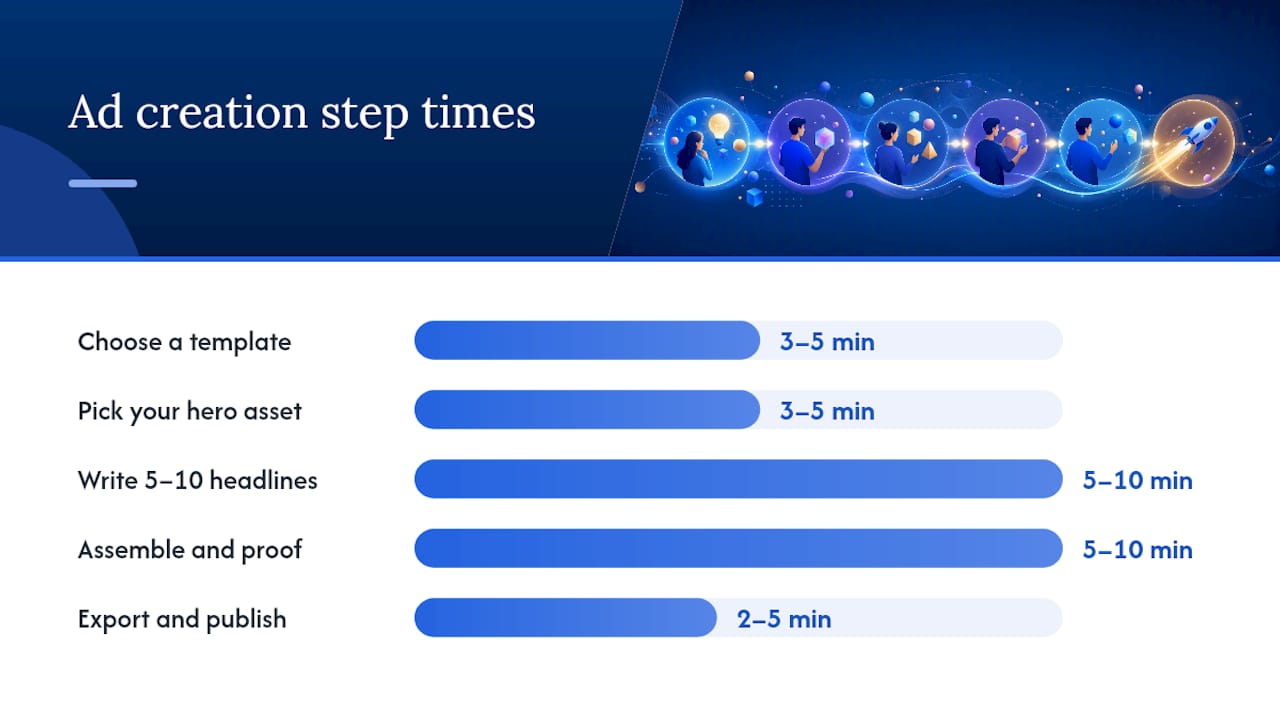
Yes, and the difference between 10 minutes and 30 minutes is mostly how long you spend writing headlines.
A template-first workflow removes every blank-canvas decision. You're not designing from scratch — you're editing. That's the whole trick.
| Step | Purpose | Target time |
|---|---|---|
| Choose a template | Match format to objective | 3–5 min |
| Pick your hero asset | Image or short video | 3–5 min |
| Write 5–10 headlines | Find the strongest hook | 5–10 min |
| Assemble and proof | Swap copy, check spacing | 5–10 min |
| Export and publish | Correct size, UTM tags | 2–5 min |
Tools like Figma, Canva, and PosterMyWall all follow this flow: browse templates, customise, export. Wide template libraries mean you can find something close to your brand in under two minutes.
Pro Tip: Pick your template by objective, not aesthetics. An awareness ad needs bold visuals and a short headline. A conversion ad needs a clear offer and a CTA button. Choosing the wrong template type is like wearing thongs to a job interview — technically fine, but sending the wrong signal.
No original imagery? Use a high-quality stock photo from Unsplash or Pexels, or pull a clean product shot from your phone. A sharp, well-lit phone photo beats a blurry "professional" image every time.
How to make a digital ad: the full step-by-step workflow
This is the build process from brief to live ad. Follow it once and it becomes muscle memory.
Step 1: Define your goal and audience
What do you want the ad to do? Drive website visits, generate leads, or sell a product? Pick one goal. Then define who you're talking to: location, age range, problem they have, and what they already know about you.
Step 2: Pick a template for your format
Match the template to the platform and placement. A square (1:1) works for Instagram feed. A vertical (9:16) suits Stories and TikTok. A landscape (1.91:1) is standard for Facebook feed and Google Display.
Step 3: Gather your assets
You need: one hero image or short video clip, your logo, brand colours (hex codes), and any proof element (a star rating, a result, a short testimonial).
Step 4: Write your headline and hook
Front-load the strongest benefit. On feed platforms, only the first 1–2 lines show before "See more" — so your hook has to earn the click before the reader expands the post.
Fill-in-the-blank headline templates:
- "Get [result] without [pain point] — [offer]"
- "Attention [audience]: [bold claim] in [timeframe]"
- "[Number] [audience] in [city] already [result]. Here's how."
- "Stop [problem]. Start [outcome] today."
- "The [adjective] way [audience] [achieve result]"
- "[Offer] — only until [date/deadline]"
- "Why [audience] choose [brand] over [generic alternative]"
- "Finally: [solution] that actually [works/delivers/lasts]"
- "[Result] guaranteed or [risk reversal]"
- "Free [lead magnet] for [audience] in [location]"
Step 5: Add proof and your offer
Numbers beat adjectives. "Rated 4.9 stars by 300+ customers" is stronger than "highly rated." A specific offer ("$50 off your first service") outperforms a vague one ("great value").
Primary text templates:
- "We help [audience] [achieve result] in [timeframe]. [Proof]. [CTA]."
- "Tired of [problem]? [Brand] gives you [solution] — [offer]. [CTA]."
- "[Number] [audience] in [location] have already [result]. Ready to be next? [CTA]."
- "[Feature] → [benefit] → [outcome]. [CTA]."
CTA templates:
- "Book your free [consult/quote/demo] today."
- "Claim your [offer] — limited spots."
- "Shop now and get [benefit]."
- "Get started for free."
Step 6: Format for the platform
Resize your creative to match the platform spec (see Section 4). Export separate variants for feed, story, and display at the same time.
Step 7: QA before you publish
- No typos (read it backwards — seriously, it works)
- Mobile preview looks clean
- All links go to the right page
- UTM parameters are attached
- Landing page confirms the offer in the ad
Step 8: Publish and tag
Set your campaign objective, audience, and daily budget. Tag the creative with a naming convention you'll recognise in three months (e.g. FB_Feed_Square_Headline-A_June26).
Pro Tip: The hook is the ad. Everything else supports it. If your first line doesn't earn attention, nobody reads the rest. Write the hook last, after you know exactly what you're selling.
What are the platform specs you need before publishing?
Always export at the platform's recommended size. Uploading the wrong dimensions means cropped logos, cut-off text, and rejected creatives.
File format tips:
- Static images: JPG or PNG, minimum 1080 px on the shortest side
- Video: MP4 (H.264 codec), under 4 GB for Meta, under 500 MB for TikTok
- Max video length: 15–60 seconds for most feed placements; Stories cut off at 15 seconds per card
Pre-upload checklist:
- Captions added to all video ads (Meta auto-generates; always review them)
- UTM parameters on every destination URL
- Landing page matches the ad's offer exactly
- Image text is minimal — Meta penalises heavy text overlay on images
- Alt text added for accessibility
Pro Tip: Export your square, vertical, and landscape variants in one session. It takes five extra minutes now and saves you a full rebuild when you want to run the same ad on a different placement.
Ad copy frameworks and 20+ fill-in-the-blank templates
Ad copy has one job: move somebody to act. Not to impress. Not to explain. To act.
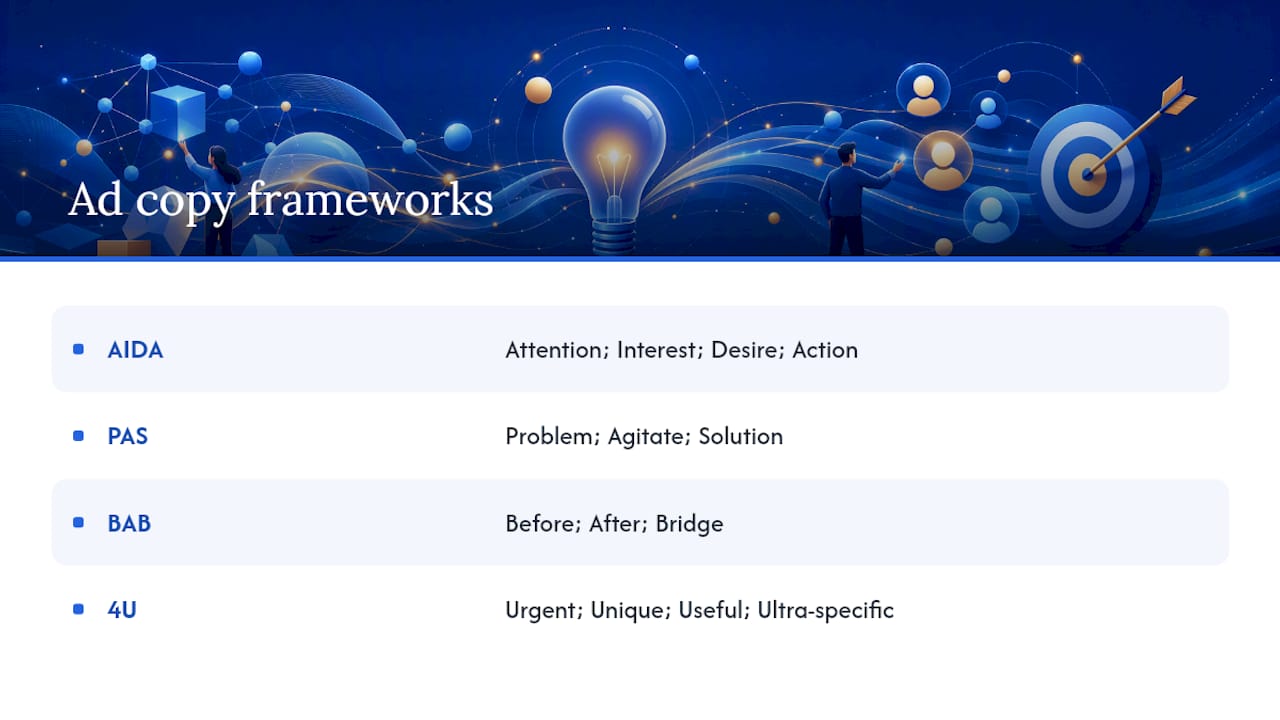
Four frameworks do most of the heavy lifting:
AIDA (Attention, Interest, Desire, Action) — the classic. Lead with a scroll-stopper, build interest with a benefit, create desire with proof, then close with a CTA. Example: "Struggling to fill your calendar? [Interest] Our clients book out 3 weeks in advance. [Desire] Get the same system — free consult this week. [Action] Book now."
PAS (Problem, Agitate, Solution) — great for conversion ads. Name the pain, make it feel real, then offer the fix. Example: "Still chasing invoices at midnight? It's costing you sleep and cash. [Name of tool] automates follow-ups so you get paid faster. Try it free."
BAB (Before, After, Bridge) — works well for social proof-heavy ads. Example: "Before: 12 leads a month. After: 47 leads a month. The bridge? A single Facebook campaign. Here's how."
4U (Urgent, Unique, Useful, Ultra-specific) — a headline formula, not a full-ad structure. Every headline should hit at least two of the four. Example: "3 spots left this month for Sydney tradies — free Google Ads audit."
Matching user intent is the single biggest lever in ad copy. Front-load the strongest benefit in the headline, and the rest of the copy earns its keep. For deeper persuasion techniques, developing persuasive copy is worth a read.
Templates by funnel stage
Awareness (top of funnel):
- "Did you know [surprising fact about audience's problem]?"
- "Most [audience] don't realise [insight]. Here's what to do instead."
- "[Number] [audience] in [location] are already [doing X]. Are you?"
Consideration (middle of funnel):
- "Comparing [option A] vs [option B]? Here's the honest breakdown."
- "What makes [brand] different: [specific differentiator]."
- "See why [number] [audience] switched to [brand]."
Conversion (bottom of funnel):
- "Ready to [result]? [Offer] — expires [date]."
- "[Audience], claim your [offer] before [deadline]."
- "One click. [Result]. No [objection]."
- "[Risk reversal] — if you don't [result], we [guarantee]."
Platform notes: Google Search headlines cap at 30 characters, so every word must earn its place. Meta shows roughly 125 characters of primary text before truncation, so front-load the benefit. TikTok scripts need the hook in the first two seconds — treat it like a verbal headline, not a warm-up.
Pro Tip: Write 10 headlines before you write a single word of body copy. Then pick your top 3 and write short, medium, and long body text for each. You'll have 9 testable variations before you've spent a dollar.
What makes a good ad image or video?
Visuals do the stopping. Copy does the selling. Get both right.
Hero image dos and don'ts:
- Do use a single focal point — one face, one product, one scene
- Do use high contrast between subject and background
- Do show a real person using the product or service (faces outperform objects)
- Don't use cluttered backgrounds that compete with the subject
- Don't use stock photos that look like stock photos (stiff poses, fake smiles)
- Don't put critical text near the edges — mobile crops are brutal
For short video:
- Motion in the first 2 seconds stops the scroll. Start mid-action, not mid-introduction.
- Captions are non-negotiable. Most people watch with sound off.
- UGC-style (user-generated content) footage shot on a phone often outperforms polished studio work — it feels native to the feed.
Asset checklist:
- Brand colours applied consistently
- Logo visible but not dominant
- Font size readable on a 5-inch screen
- Subtitles on all video
- Alt text on all static images
Adding social proof to your visuals — a star rating overlay, a short testimonial, a "as seen in" badge — can lift credibility fast.
Pro Tip: Before you export, zoom out to thumbnail size and check that the focal point is still obvious. If you can't tell what the ad is about at 100×100 pixels, neither can someone scrolling at speed.
Does $10 a day actually work for digital ads?
Honestly? It depends on what you're asking it to do.
$10/day can work for:
- Brand awareness in a tight local area
- Testing headlines and creative before scaling
- Retargeting a warm audience who already visited your site
- Low-competition niches with cheap CPCs
$10/day will struggle with:
- Competitive industries (legal, finance, real estate) where CPCs can run several dollars per click
- Conversion-focused campaigns that need volume to exit the learning phase
- Cold audiences in large geographic areas
Platform CPCs vary dramatically — from cents in some display placements to several dollars in competitive Google Search categories. A $10/day Google Search campaign in a high-CPC niche might generate only 2–3 clicks. The same $10 on Meta retargeting a warm audience could reach hundreds of people.
Ways to stretch a small budget:
- Narrow your geographic targeting to your actual service area
- Use dayparting (run ads only during your audience's active hours)
- Retarget website visitors first — they convert at a far higher rate than cold traffic
- Use organic content to warm audiences before paying to reach them
Pro Tip: Spend your first $50–$100 testing headlines only. Run 3–5 headline variations against the same audience with the same creative. The winner tells you what your audience actually responds to — then scale that message.
How do you test and improve your ads?
Test one variable at a time. That's the whole rule. Everything else is detail.
Testing priority order:
- Headline/hook — biggest impact on CTR and quality score
- Offer — changes conversion rate more than anything else
- Creative — image vs video, lifestyle vs product
- CTA — "Book Now" vs "Get a Free Quote" vs "Learn More"
- Audience — only after the creative is proven
Run each test for at least 3–5 days, or until you've gathered enough impressions to see a pattern. Changing variables mid-test invalidates the result — resist the urge.
KPIs by objective:
- Awareness: CPM (cost per 1,000 impressions) and reach
- Consideration: CTR (click-through rate) and engagement rate
- Conversion: CPA (cost per acquisition) and ROAS (return on ad spend)
Testing checklist:
- One variable changed per test
- Same audience, same budget, same timeframe
- Results documented before you change anything
- Winning variant becomes the new control
For a deeper look at A/B testing for SMB budgets, Adsdaddy's split-testing guide covers the full cadence. And for optimising ad campaigns once you have a winner, the step-by-step process is worth bookmarking.
Australian legal checks every advertiser needs to know
Misleading or deceptive ads are illegal under Australian Consumer Law. The ACCC enforces this, and "I didn't mean to mislead anyone" is not a defence.
Legal checklist for Australian advertisers:
- Truthful claims only — every claim in your ad must be accurate and supportable with evidence
- Comparative claims need proof — if you say "Australia's best" or "cheaper than competitors," you need documentation
- Licensed imagery — never use an image you don't own or haven't licensed; stock photo sites like Shutterstock, Adobe Stock, or free-use platforms like Unsplash are your safest options
- Clear pricing — if you advertise a price, it must include GST and any mandatory fees
- Landing-page match — the offer in your ad must be available on the landing page; a bait-and-switch (even accidental) can breach ACL
- Platform policy compliance — Meta, Google, and TikTok each have their own advertising policies on top of ACL; a compliant ad under ACL can still be rejected by a platform
The ACCC's guidance on misleading advertising is the primary reference for Australian businesses. Platform policy checks are a separate step — run both before launch.
Pro Tip: Keep dated screenshots of every promotional claim you run — the ad creative, the landing page, and the offer terms. If a complaint is ever raised, that evidence file is your first line of defence.
Common mistakes that quietly ruin ad performance
Most wasted ad spend comes from the same handful of errors. Here they are, with the one-line fix for each:
- Vague headline → Write 5 specific headlines with a clear benefit or number
- Mismatched landing page → The page must confirm the ad's exact offer within 3 seconds of loading
- No proof → Add one number, rating, or result to every ad
- Weak or missing CTA → One instruction, one link, one action — never two
- Poorly cropped image → Check the mobile preview before publishing; edges get cut
- Too much text on image → Keep overlay text minimal; Meta penalises heavy image text
- Targeting too broad → Start narrow, then expand once you have a winning creative
- Changing the ad mid-test → Let it run; premature edits reset the learning phase
- No UTM tags → You can't optimise what you can't measure
- Sending traffic to a homepage → Always use a dedicated landing page that matches the ad's offer
Each of these mistakes has a cost. A vague headline lowers CTR, which raises your cost per click. A mismatched landing page tanks your Quality Score on Google, making every future click more expensive. A missing CTA leaves the reader with nowhere to go.
Pro Tip: The single most preventable mistake is a mismatched landing page. Check it last, every time, no exceptions. It's the difference between a campaign that converts and one that just burns budget.
Adsdaddy gets you results faster than DIY alone
DIY works brilliantly up to a point. That point is usually when you're spending real money, running multiple campaigns, and still not sure which variable is actually driving results.
Adsdaddy is a full-service digital advertising agency built for Australian small and medium businesses who want campaigns that perform, not just campaigns that exist. The team handles creative builds across Facebook, Instagram, Google, YouTube, LinkedIn, and Microsoft Ads — plus campaign management, performance optimisation, and testing cadences that find your winners faster. No guessing. No wasted months on a creative that was never going to convert.
If you're ready to stop running ads on hope and start running them on data, book a strategy session with Adsdaddy today.
The honest strategist's take
Most people overthink the ad and underthink the offer. I've seen beautifully designed creatives with clever copy fail completely because the offer was weak or the landing page was a mess. And I've seen ugly, phone-shot video ads with blunt copy absolutely clean up because the offer was irresistible and the page delivered on the promise.
The template-first approach works because it removes the blank-canvas paralysis and gets you to the thing that actually matters: testing. You can't optimise what you haven't published. Get something live, measure it, improve it. That's the whole game.
If you want a shortcut past the trial-and-error phase, book a quick audit with Adsdaddy and we'll show you exactly where your current setup is leaking spend.
FAQ
How do I create a digital ad from scratch?
Pick a template in a tool like Canva or Figma, swap in your hero image, write a benefit-led headline, add a CTA, and export at the platform's recommended size. The full workflow takes 10–30 minutes.
Is $10 a day enough for Google Ads?
It can work for testing and awareness in low-competition niches, but in high-CPC categories it may generate only a handful of clicks per day. Use $10/day to test headlines first, then scale the budget once you have a proven creative.
How much does it cost to create a digital ad?
DIY using a template tool costs nothing beyond your time. Hiring a specialist or agency varies widely depending on scope — from a few hundred dollars for a single creative to ongoing monthly retainers for full campaign management.
Is running a misleading ad illegal in Australia?
Yes. Misleading or deceptive advertising breaches Australian Consumer Law, which the ACCC enforces. Claims must be truthful and supportable, pricing must include GST, and the landing page must match the offer in the ad.