Google Display Ads: Fix Performance with 3–4 Responsive Ads
. By Ads Daddy.

The fastest way to fix underperforming Google Display campaigns is simple: build responsive display ads with a full asset set, run 3 to 4 ads per ad group, and judge everything on conversions and cost-per-acquisition, not clicks. Stop chasing click-through rate. Feed Google's machine learning enough creative variety and it does the heavy lifting for you.
TL;DR:
- Building three to four responsive display ads per ad group with diverse asset sets is essential to allow Google's machine learning to identify high-performing combinations.
- A full asset library should include up to 15 images in various ratios, five headlines, descriptions, and a clear CTA, avoiding repetitive messaging to maximize testing effectiveness.
- Focus on conversion metrics like CPA and ROAS, as click-through rates are naturally low on Display, and retargeting campaigns outperform prospecting audiences.
- Keep campaigns tightly themed with 5 to 20 keywords per ad group, separating remarketing from prospecting and selecting targeted audiences to prevent budget waste.
- Consistent creative rotation, asset quality, and policy compliance are crucial to prevent fatigue, disapproval, and ensure sustained campaign performance.
Table of Contents
- What are the best practices for Google Display Ads?
- Creative essentials for responsive display ads
- Technical specs and formats you need to get right
- Campaign structure, targeting and setup best practice
- Measurement and optimisation: metrics that matter
- Testing, creative rotation and fatigue management
- Troubleshooting and policy compliance
- Adsdaddy's practical playbook and quick checklist
- When to choose Display and how to use it with other channels
- Ready to fix your Display ads without doing it yourself?
- Sources
- FAQ
What are the best practices for Google Display Ads?
Here's the uncomfortable truth: most Display campaigns fail because someone uploaded three images, wrote one headline, and called it a day.
That's not a campaign. That's a coin flip.
Google's own guidance is blunt about this: the system wants options. It wants to test combinations across placements, audiences, and devices, and it can only do that if you give it enough raw material to work with.
Google recommends 3 to 4 responsive display ads per ad group to properly test messaging and imagery variations. Fewer than that and you're not testing anything. You're guessing.
Best practice for Google Display Ads boils down to three pillars, and every section below builds on them:
- Responsive-first creative with a genuinely diverse asset library
- Tight campaign structure that matches targeting to intent
- Conversion-led measurement instead of vanity-metric chasing
Get those three right and you're already ahead of most advertisers running Display right now. Let's break down exactly how to build it.
Creative essentials for responsive display ads
Think of responsive display ads like a dating profile with multiple photos. One awkward selfie and you're swiped left. A gallery of options, and someone finds the version of you that clicks.
Google's creative best practices guide recommends uploading up to 15 images, 5 short headlines, 1 long headline, and up to 5 descriptions per responsive display ad. That's not a suggestion to max out for the sake of it. More assets give the algorithm more combinations to test across placements, so it can find the pairing that actually converts instead of settling for "good enough."
Here's your asset shopping list:
- Images at 1.91:1 (landscape, the workhorse ratio for most placements)
- Images at 1:1 (square, critical for feed-style and social-adjacent inventory)
- Images at 9:16 (vertical, increasingly important as mobile and app inventory grows)
- Logos at 1:1 (square logo, no text baked in)
- Logos at 4:1 (landscape logo lockup)
- 5 short headlines (30 characters each, punchy and distinct, not five versions of the same sentence)
- 1 long headline (90 characters, this is your one shot at a fuller pitch)
- Up to 5 descriptions (90 characters each)
- Promotional text and a clear CTA
Notice the word "distinct" up there. Uploading five headlines that all say some version of "Shop Now And Save Big Today" is like showing up to five dates wearing the same shirt. Google's algorithm needs genuine variation, not synonyms.
Why more assets actually work in your favour
This isn't about ticking boxes to please an algorithm for the sake of it. Responsive display ads outperform legacy or manual-size-only setups because Google's machine learning can recombine your assets across an enormous range of placements and screen sizes. A banner you hand-built for 300x250 simply cannot flex into a 9:16 vertical slot. A responsive ad, stocked with the right ratios, can.
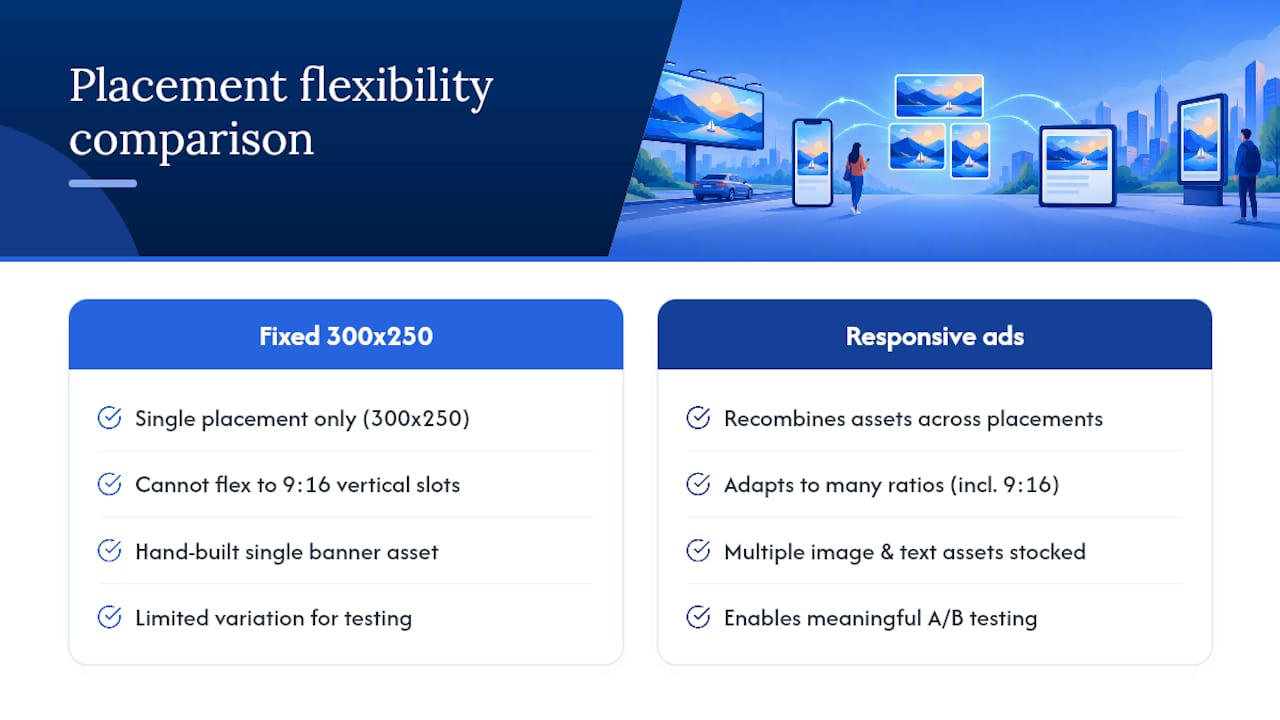
The catch? Garbage in, garbage out. If your five headlines are all restating the same benefit, you haven't given the system anything new to test. You've just cloned mediocrity five times.
Composition rules that stop your ads looking like ransom notes
- One idea per creative. Don't cram a discount, a testimonial, and a CTA into one image. Pick the strongest hook and commit.
- Avoid heavy text overlays. Google's policy team flags these constantly, and even when they pass review, they render poorly at small sizes.
- Prioritise contrast and legibility. If your CTA button blends into the background, you've built an ad nobody can act on.
- Design for thumbnail size first. Most Display inventory shows up small, on a sidebar or inside an app. If it doesn't work at postage-stamp size, it doesn't work.
If you can't tell what the ad is selling in two seconds, neither can the person scrolling past it.*
Quick fixes for common creative crimes
Got assets that are underperforming or getting flagged? Try these before you rebuild from scratch:
- Compress the file rather than shrinking the image dimensions, which often destroys legibility.
- Swap a busy photographic background for a clean gradient or solid colour. It resolves most rendering issues without losing visual punch.
- Shorten headline copy that's trying to say three things at once, down to one clear statement.
Landing page relevance matters here too. Make sure the message in your creative actually matches what's waiting on the other side of the click, because a mismatch between ad promise and landing page reality tanks conversion rates fast. If you haven't audited that alignment recently, this guide on landing pages in ads is worth a read before you spend another dollar on creative.
Technical specs and formats you need to get right
Specs are boring. Disapproved ads are worse.
Here's the copy-paste version so you never have to dig through a help centre again.
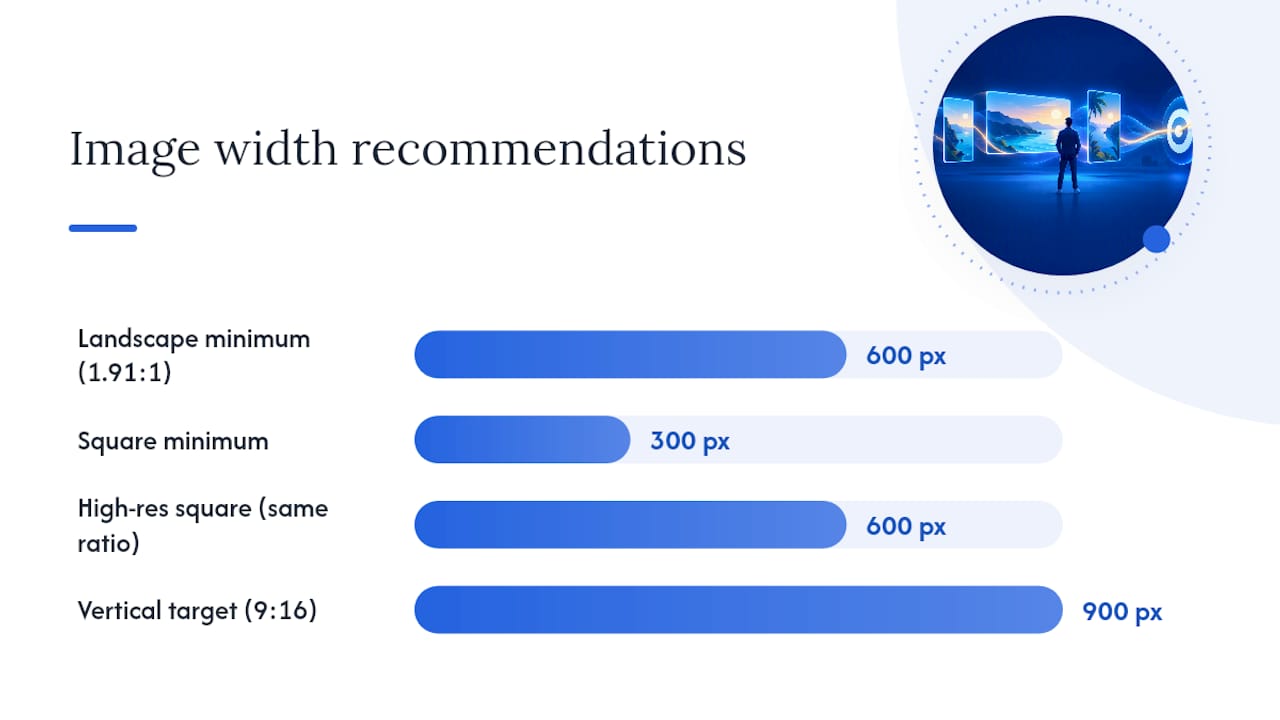
For responsive display image assets, Google recommends a minimum of 600x314 for landscape (1.91:1), 300x300 for square, and 600x600 for the same ratio at higher resolution, with 900x1600 as a solid target for vertical 9:16 assets. Accepted file formats are JPG, PNG, and GIF, and each image file needs to sit under 5,120KB.
If you're still running manual, static banners alongside your responsive ads (and there are good reasons to, which we'll get to), stick to formats built as JPG, PNG, GIF, or HTML5 inside a zip file, and keep static creative under roughly 150KB wherever your ad server allows, since heavier files render more slowly and lose impressions on slower connections.
| Banner size | Common name | Why it earns a spot |
|---|---|---|
| 300x250 | Medium Rectangle | The single most common placement across the Display Network |
| — | Large Rectangle | High-visibility in-content slot, strong for publishers |
| — | Leaderboard | Dominant desktop top-of-page real estate |
| 300x600 | Half Page | High-impact sidebar format with strong viewability |
| — | Wide Skyscraper | Reliable fallback for sidebar-heavy sites |
| — | Mobile Banner | Covers the bulk of mobile web inventory |
These six sizes cover the overwhelming majority of available Display inventory. If you're building manual creative rather than relying purely on responsive assets, start here and expand later.
Logos need their own attention. Keep them clean, square (1:1) or landscape (4:1), with breathing room around the mark rather than crammed edge-to-edge. If your background is white or near-white, add a subtle border, because Google's rendering engine can otherwise blend a white logo straight into a white placement and make it disappear.
Dynamic image assets and auto-generated video are worth testing once your account has enough conversion volume to support them, but treat them as a supplement, not a replacement. Auto-generated video in particular needs a manual review pass before it scales, because motion and pacing that look fine in isolation can feel jarring stitched together automatically. Check every aspect ratio renders as intended before you trust it with real budget.
Campaign structure, targeting and setup best practice
A messy campaign structure is like a share-house junk drawer. Everything's technically in there, but good luck finding the scissors when you need them.
Google's own Display Network guidance suggests keeping ad groups tight, with 5 to 20 keywords per ad group when you're using keyword-based contextual targeting. That range isn't arbitrary. Fewer than five and your targeting is too narrow to gather meaningful data. More than twenty and you've built an ad group with no coherent theme, which means your creative can't speak to anyone specifically.
The fix is simple: one theme, one audience intent, one creative angle per ad group. If you're selling running shoes and yoga mats, that's two ad groups, not one confused mega-group trying to please everybody.
Pick the right targeting for the job
- Remarketing audiences should live in their own campaigns, separate from prospecting. These people already know you. Treat them differently and bid differently.
- Custom intent audiences let you target people actively researching terms related to your product, even outside search, which is one of the most underused levers in Display.
- In-market audiences are Google's own pre-built segments of people showing purchase intent in a category, useful when you don't have enough first-party data to build custom intent lists yet.
- Affinity audiences target broader lifestyle interests, better suited to top-of-funnel brand awareness than direct response.
- Placement targeting lets you hand-pick specific apps, YouTube channels, or websites, while placement exclusions let you block the junk inventory that inevitably creeps in (low-quality apps, content mismatches, anything that doesn't fit your brand).
Bidding and setup that doesn't waste your budget
Set up conversion tracking before you touch a bid strategy. This sounds obvious. It is routinely skipped.
Once you've got reliable conversion data flowing, Smart Bidding strategies like Target CPA or Target ROAS generally outperform manual CPC for Display, because they let Google's algorithm adjust bids in real time based on likelihood to convert, something no human can do at that speed across thousands of auctions a day.
Name your campaigns and ad groups so a stranger could audit them in thirty seconds. Something like "Display_Prospecting_InMarket_Fitness" beats "Campaign 3" every single time you're trying to work out where budget is actually going.
Measurement and optimisation: metrics that matter
Here's a stat that should permanently change how you judge Display performance: average click-through rates across the Google Display Network typically sit somewhere around 0.05% to 0.1%. That's not a typo, and it's not your campaign failing. Retargeting audiences usually perform several times better than that baseline, simply because those people already know your brand.
If you're benchmarking Display against Search CTR, you're comparing a billboard to a search result. They're different jobs.
So what should you actually watch?
- Conversions and CPA first and always. This tells you whether the campaign makes money, not whether people found it visually interesting.
- ROAS, especially for ecommerce, where revenue per dollar spent is the only number that matters to the person signing off on budget.
- View-through conversions, which capture people who saw your ad, didn't click, but converted later through another channel. Ignoring these massively undersells Display's real contribution.
- Assisted conversions, showing where Display sits in a longer conversion path rather than always demanding last-click credit.
- CTR, contextually. Judge prospecting campaigns against other prospecting campaigns, and retargeting against other retargeting. Never cross the streams.
Google's asset report is where the real optimisation work happens. It grades individual images, headlines, and descriptions by performance label, ranging from "Low" to "Best," based on actual conversion volume, conversion rate, and CPA. Assets sitting on "Low" for a couple of weeks with decent impression volume are dragging the whole ad down. Pause them and swap in something genuinely different, not just a colour variant.
Give any asset test a proper sample size before you judge it. Cutting a headline after 200 impressions tells you nothing. Give it enough volume to reach statistical relevance for your account's typical conversion rate, then act on the signal.
If you want a deeper dive on turning traffic into conversions once someone lands on your site, this conversion rate optimisation guide covers the landing-page side of the equation well.
Testing, creative rotation and fatigue management
Creative fatigue is real, and it sneaks up on you like a song you loved in January and can't stand by March.
Here's the playbook to stay ahead of it:
- Build 3 to 5 distinct creative variants per campaign, not five colour-swapped clones of the same layout. A genuinely different angle, headline hook, or visual approach beats a palette change every time.
- Adapt each angle across your key aspect ratios (1.91:1, 1:1, 9:16) rather than stretching one composition to fit and hoping nobody notices the distortion.
- Set a frequency ceiling. As a rule of thumb, once the same person has seen an ad more than 6 to 8 times in a week without converting, you're burning impressions, not building intent.
- Watch for the fatigue signature: CTR sliding while CPM climbs and conversions stay flat. That combination means your audience has seen enough, and it's time to refresh.
- Run a simple pass or fail test. Give a new creative angle two to three weeks and a real budget share. If it beats your current best performer on CPA, it's your new benchmark. If it doesn't, pull it and try the next angle, not a tenth colour variant of the same idea.
Pro Tip: Name your creative files with the launch date baked in (e.g. "Fitness_Angle2_2026-03-14"). When you're staring at a fatigue graph six weeks later, you'll thank yourself for not having to guess which asset is which.
Keep a rolling readiness checklist so new creative never sits in a drafts folder while an old, tired ad quietly bleeds budget: brief approved, assets sized correctly, CTA confirmed, landing page live and matching the message.
Troubleshooting and policy compliance
Most Display disapprovals trace back to a handful of repeat offenders, and every single one of them is fixable in under an hour.
- Text overlays on images. Google's policy engine flags heavy text baked into creative. Move copy into the headline and description fields where it belongs.
- Destination mismatch. If your ad promises 20% off and the landing page shows full price, that's a policy and a conversion problem rolled into one.
- White backgrounds without a border. Add a subtle outline so your creative doesn't visually vanish into white-background placements.
- Oversized files. Compress before you upload rather than after a rejection notice tells you to.
Before launch, preview your responsive ad across every aspect ratio it could serve in. What looks sharp at 1.91:1 can crop awkwardly at 9:16 if a key element sits too close to the edge.
Watch account-level automation too. Settings like automatically-created assets or broad optimised targeting can quietly override your carefully built creative mix if left unchecked. Check them before every major campaign push.
A pre-launch checklist beats a post-launch panic every time: assets sized and compressed, CTA confirmed, landing page live, previews checked, automation settings reviewed. Five minutes now saves days of disapproval limbo later.
Adsdaddy's practical playbook and quick checklist
Here's how this all comes together when you're running it for real, not just reading about it.
The rollout, start to finish:
- Brief: lock the offer, audience, and single creative angle before anyone opens a design file.
- Creative: build the full asset set across all required ratios, not the minimum Google technically accepts.
- Build: structure ad groups by theme, set conversion tracking, choose Smart Bidding once volume allows.
- QA: preview every aspect ratio, check landing page match, confirm file sizes.
- Launch: start with a realistic budget split across 3 to 4 ad variants per group.
- Monitor: give it two to three weeks before judging, watching CPA and conversions over CTR.
- Refresh: swap "Low"-labelled assets, rotate in a new creative angle before fatigue sets in.
Three fixes Adsdaddy applies constantly on live client accounts: replacing a single hero image with a full ratio set the same week performance stalls, separating remarketing budget from prospecting budget so retargeting numbers stop dragging down blended reporting, and swapping stretched manual banners for genuine responsive assets once conversion volume supports it.
Running this at scale, with proper asset counts and rotation schedules across multiple ad groups, is where most in-house teams run out of hours in the week. A managed setup keeps the rotation calendar moving and the budget protected from the sizing and policy mistakes covered above.
When to choose Display and how to use it with other channels
Display earns its budget on reach and awareness, not on winning a click-through rate contest against Search. It's the cheapest way to put your brand in front of a relevant audience at scale, and retargeting inside that same network is where Display starts pulling genuine direct-response weight.
The channel pairings worth building into your media plan:
Display plus Search captures the demand Display creates. Someone sees your ad, doesn't click, then Googles your brand name a week later. Display plus Social extends prospecting reach across two very different environments, catching people mid-scroll rather than mid-search. Display plus Email nurtures people already in your funnel, keeping the brand visible between purchase decisions.
Treat Display as the quiet, patient part of the mix. It rarely gets the credit line, but it's doing real work underneath the numbers Search and Social claim as their own.
— Adrian
Ready to fix your Display ads without doing it yourself?
You've now got the full playbook: responsive assets, tight ad groups, conversion-led measurement, and a rotation schedule that beats fatigue before it costs you money. The gap between knowing this and actually running it at scale, across multiple ad groups, asset sets, and rotation calendars, is exactly where most in-house teams stall.
Adsdaddy exists to close that gap. Instead of learning Google's asset specs, building six aspect ratios per creative angle, and manually swapping "Low"-labelled assets every fortnight, you hand it to a team that already does this daily across Google, Meta, YouTube, and beyond, with integrated tracking so leads actually land somewhere useful. If leads are the real goal rather than clicks, the pay per lead guide compares buying finance enquiries one at a time with an enquiry engine of your own. For a fuller managed campaign build, the lead generation service covers strategy, creative production, and rotation as one package. Book a campaign review and find out exactly what's leaking budget in your current setup.
Sources
For the full technical detail behind these recommendations, Google's own Display Network optimisation guidance and its creative best practices resources cover asset specs and policy rules in depth. Adsdaddy's own breakdown of display ad best practices and its Google Ads setup guide expand on account structure and conversion tracking setup.
- Best practices guide for responsive display ads
FAQ
What are the best practices for Display ads?
Build responsive display ads with a full asset set (up to 15 images, 5 short headlines, 1 long headline, up to 5 descriptions), run 3 to 4 ads per ad group, and optimise for conversions and CPA rather than clicks. Pair that with tight ad group themes, proper conversion tracking, and regular creative rotation to avoid fatigue.
What is a good CTR for Google Display Ads?
Display CTR is naturally low, with typical averages sitting around 0.05% to 0.1% across the network, so don't benchmark it against Search. Retargeting campaigns usually perform several times better than that prospecting baseline, since that audience already knows your brand.
What's a good CPM for Display ads?
CPM on Display varies significantly by audience type, placement quality, and industry competition, so there's no single universal benchmark worth quoting. It's more useful to track your own CPM trend over time alongside conversions. If CPM climbs while conversions stay flat, that's your fatigue signal to refresh creative.
Is $20 a day good for Google Ads?
A $20 daily budget can work for a tightly targeted remarketing campaign or a small local test, but it's tight for broad prospecting where you need volume to gather conversion data. Whether it's "good" depends entirely on your cost per lead target and how many conversions that budget realistically needs to produce.
How many ads should be in each Google Display ad group?
Google recommends 3 to 4 responsive display ads per ad group to properly test different messaging and imagery combinations. Running fewer than that limits how much Google's machine learning can test, while running far more inside one group usually signals the group's theme is too broad.