Google Ads Budget: Reverse Solve Daily Spend for Small Businesses
. By Ads Daddy.

Your Google Ads budget is not a spending cap. It's an instruction to an algorithm, and the fastest way to waste money is treating it like a bill you're trying to shrink. Pick a number by reverse solving from a revenue or cost per acquisition target, respect Google's daily and monthly pacing rules, then test for at least two to four weeks before you touch it again.
TL;DR:
- Setting a Google Ads budget should be based on a revenue or CPA goal, not guessing or copying competitors' spend levels.
- Google overdelivers daily spending up to twice the set budget, but monthly caps prevent total overspending, making regular pacing checks essential.
- Small businesses should allocate most of their budget to branded search first, then expand into Shopping, Performance Max, and non-brand campaigns as data accumulates.
- A minimal effective budget depends on industry and CPC; low budgets like $15 daily can test offers but won't reliably run advanced automations.
- Using Google's forecasting tools helps establish realistic test budgets, but campaigns need proper structure and pacing to achieve meaningful results.
Table of Contents
- How Google counts and paces your Google Ads budget
- How do you set a Google Ads budget from scratch?
- What's a realistic Google Ads budget for a small business?
- How should you split your Google Ads budget across campaigns?
- Why does budget size affect Smart Bidding performance?
- Which Google Ads tools help you plan and forecast spend?
- AdsDaddy's take on setting a Google Ads budget for SMBs
- Want AdsDaddy to build and manage your Google Ads budget?
- Sources for budgeting mechanics and forecasting
- FAQ
How Google counts and paces your Google Ads budget
Here's the bit that trips up almost every new advertiser: the number you type in is called an average daily budget, and "average" is doing a lot of work in that phrase.
Google doesn't spend the same amount every single day. Some days it'll spend more, some days less, chasing the days when your audience is actually online and clicking. That's overdelivery, and it's completely normal.
The guardrails are simple once you know them:
- Daily spending limit: usually up to double your average daily budget on any given day.
- Monthly spending limit: your daily budget multiplied by 30.4 (Google's official average days per month, because not every month is 30 or 31 days).
So if you set a $10/day budget, Google might spend $20 on a cracking Tuesday, but it will never bill you more than $304 across the month. That's the deal. Overdelivery evens out because Google caps the monthly number, not the daily one.
There's also a difference between served cost (what technically ran) and billed cost (what actually hits your card). Served can spike above your daily number; billed never exceeds your monthly cap. You can check both in the Budget Report inside Google Ads, which shows projected spend and how past changes affected delivery.
Pro Tip: Check your Budget Report weekly, not monthly. Catching a pacing issue on day 3 saves you a month of "why did we underspend again" headaches.
If you want a deeper walk through setting this up correctly from scratch, our Google Ads setup guide for small business covers the account structure that makes budgets behave.
How do you set a Google Ads budget from scratch?
Forget guessing. Forget copying what your mate's landscaping business spends. Use maths.
There's a three-step method that works whether you're selling candles or consulting services, and it starts with a goal, not a number.
- Set a measurable goal and a target ROAS or CPA. Decide what "working" looks like before you spend a cent. Want $20,000 in monthly revenue at a 5x return on ad spend? That's your target. Want leads at under $40 each? That's your CPA ceiling.
- Reverse solve the math. Required Ad Spend = Revenue Goal ÷ Target ROAS. Then divide by 30.4 to get your daily budget. This flips the usual approach on its head. Instead of asking "what can I afford?", you're asking "what does hitting my goal actually cost?"
- Define a minimum test window and a safety margin. Commit to a fixed spend over a fixed timeframe (two to four weeks minimum) before judging results, and pad your number slightly so you're not starving the account the moment costs fluctuate.
Worked example: Say you run a small home services business and want $20,000 in monthly revenue from Google Ads, with a realistic 5x ROAS for your industry.
Required Ad Spend = $20,000 ÷ 5 = $4,000/month.
Convert to daily: $4,000 ÷ 30.4 = $131.58/day.
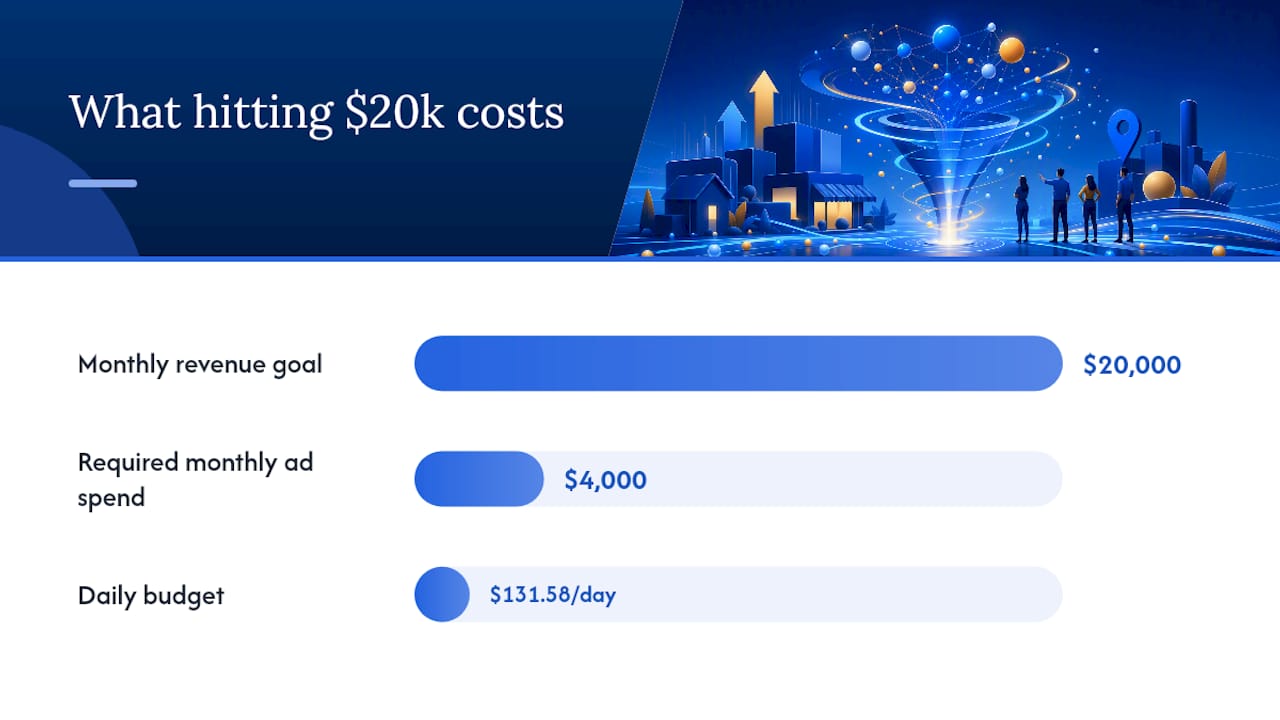
That's a completely different exercise to picking a number that "feels right." Reverse solving from revenue gives you a figure you can defend to a business partner, a bank manager, or your own nervous conscience at 2am.
If crunching this feels like homework, our guide on optimising your ad campaign budget for better leads and sales breaks the formula down with more scenarios.
What's a realistic Google Ads budget for a small business?
Everyone wants the magic number. There isn't one. But there are ranges, and they're worth knowing before you set expectations that no budget can meet.
Most small to medium businesses starting out land within a commonly referenced budget range that varies by industry and time of year.
A few things move that number around:
- Industry and competition: cost per click varies wildly by category, and competitive verticals see real seasonal spikes, sometimes tied to broader economic shifts that push advertiser demand up or down across an entire sector.
- Campaign type: Performance Max and Shopping campaigns typically need a sufficiently high monthly budget to reliably optimise. Below that, the algorithm may not learn fast enough to perform well.
- Seasonality: retail, travel and services businesses all see CPCs move with demand cycles. A budget that worked fine in April can get outgunned in a peak trading month if you don't plan ahead.
The reality check: if your target CPC in a competitive category sits around $8 to $12 and you need 30 clicks a day to generate enough leads, you're already looking at $240 to $360/day before you've spent a cent on Shopping or Display. Run the numbers before you set the budget, not after you're disappointed by it.
Low budgets aren't useless. They're just limited. A $15/day budget on Search can validate an offer or test messaging. It cannot reliably run Performance Max, and it definitely can't compete in a high CPC category and expect volume.
How should you split your Google Ads budget across campaigns?
Splitting budget badly is the single most common way SMBs torch money on Google Ads. Here's the order of operations that actually works.
Fund branded search first. Always. It's a small slice of total spend, but it defends demand you already own at the lowest cost per acquisition in the account. Someone searching your business name is basically raising their hand and saying "take my money." Don't let a competitor bid on that moment and steal the click.
Then allocate by funnel stage and business model. A rough allocation guide, adjusted for your specific business:
- Branded search: 15 to 25% of total budget. Non-negotiable, even on a tight budget.
- Shopping/Performance Max: 40 to 60% for product-led, ecommerce businesses with strong feed data.
- Non-brand search: the bulk of remaining spend for service businesses chasing new demand.
- Display/YouTube: a smaller top-of-funnel slice, useful for brand awareness once your core campaigns are converting well.
Your stage matters too. A starter account should lean almost entirely on branded search and one tightly focused non-brand campaign, keeping things simple while data accumulates. A scaling account with proven conversion data can afford to push more into Performance Max and expand non-brand match types. A mature account with months of conversion history can run a genuinely diversified mix, including Display and YouTube, because the algorithm has enough signal to spend intelligently across all of it.
Pro Tip: Don't launch five campaign types on day one. Prove branded search and one non-brand campaign convert first, then expand. Spreading a small budget across six campaigns is like ordering a degustation menu with a $20 note. Everyone gets a taste, nobody gets fed.
Cross-channel readers juggling Google alongside Meta should also check our piece on optimising ad spend across Facebook and Google for the bigger allocation picture.
Why does budget size affect Smart Bidding performance?
Here's a fact that catches out a lot of well-intentioned advertisers: a budget that's too small doesn't just limit reach, it actively cripples your automated bidding.
Smart Bidding needs a minimum volume of conversions to learn what a good click looks like. Starve the campaign of budget, and you starve it of data. The algorithm never gets enough signal to figure out who's likely to convert, so it keeps guessing, and guessing is expensive.
Practical moves that keep your account fed and performing:
- Review search terms weekly and add negative keywords. Every irrelevant click you block is budget redirected toward someone who might actually buy.
- Audit conversion tracking monthly. If your tracking is broken or double counting, every optimisation decision downstream is built on rubbish data.
- Set a reallocation rule. If one campaign consistently beats target CPA while another lags, shift budget toward the winner weekly, not quarterly.
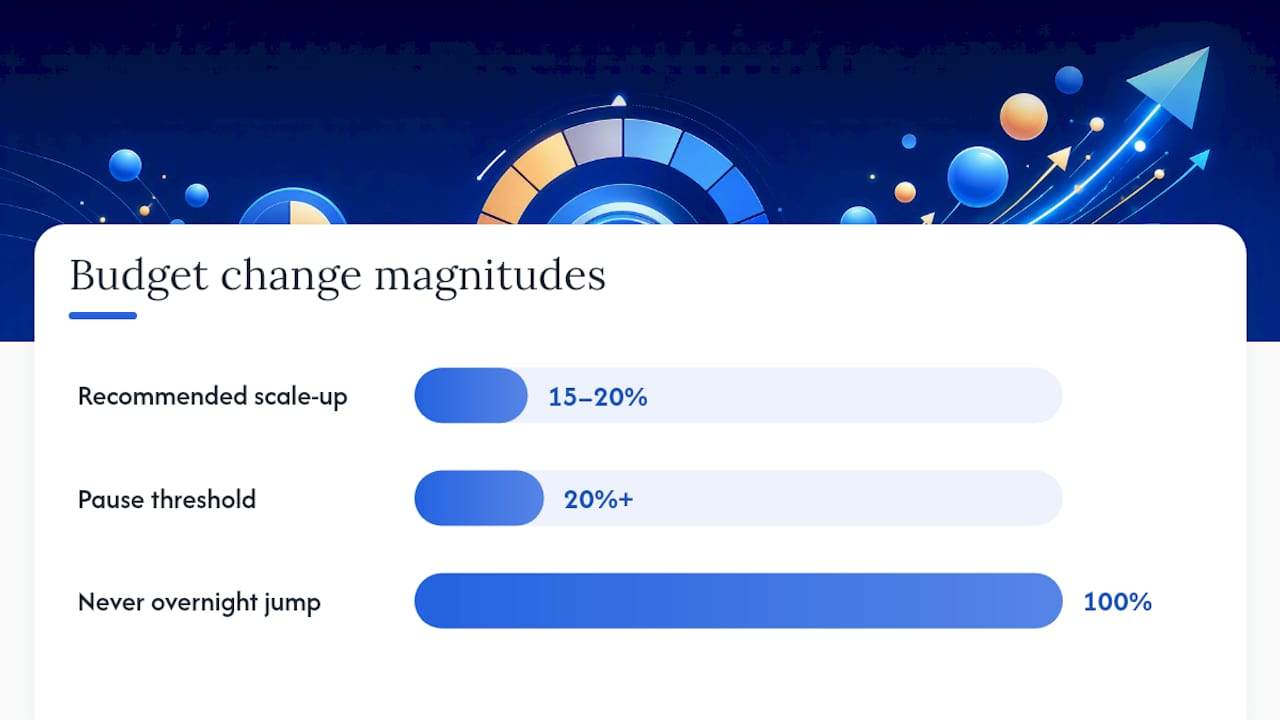
- Know your scaling trigger. A campaign that's held CPA below target for two consecutive weeks with growing conversion volume is ready for a budget increase, typically 15 to 20% at a time so the algorithm can adjust without a shock.
- Know your pause trigger. A campaign burning 20% or more above target CPA for two straight weeks with no improving trend needs a pause and a rebuild, not another week of hope.
Pro Tip: Never double your budget overnight unless you enjoy watching an algorithm panic. Sudden jumps reset learning phases. Scale in steps, not leaps.
At very low spend levels, skip Performance Max altogether and run simpler manual or standard Search campaigns until you can reliably hit the volume Smart Bidding needs. Running PMax on scraps just burns your test budget on a learning phase that never finishes.
For more tactics on stretching limited spend without cutting corners on results, see conversion rate optimization tips to increase your conversion volume for the same spend.
Which Google Ads tools help you plan and forecast spend?
Stop guessing what a budget change will do. Google gives you the tools to model it before you touch a live campaign.
- Performance Planner: analyses your existing campaign performance and forecasts how a budget increase or decrease would shift clicks, conversions and cost. Run this before any major change.
- Budget Report: shows projected monthly spend and how past budget edits actually played out, useful for catching pacing issues early.
- Reverse ROAS calculator: best when you already have a revenue target and need to work backward to a spend number.
- Clicks based forecasting: better suited to newer accounts with limited conversion history, where you're estimating traffic volume first.
Whichever tool you use, convert the output into a minimum test budget with a guardrail, a fixed floor you won't dip below and a ceiling you won't exceed until the test window closes.
AdsDaddy's take on setting a Google Ads budget for SMBs
Three rules guide how we think about budgets for every SMB account we touch. Defend branded search first, always. Fund the campaigns actually driving conversions before you fund the ones you hope will. And never underfund AI driven tactics like Performance Max or Smart Bidding. Half a budget on Smart Bidding is worse than a full budget on manual bidding, because you're paying for a learning phase that never graduates.
The businesses that scale fastest aren't the ones with the biggest budgets. They're the ones who match spend to strategy and refuse to guess. If you want a second opinion on your numbers, a 30-day test plan is usually all it takes to know if your budget is right or just optimistic.
— Adrian
Want AdsDaddy to build and manage your Google Ads budget?
Managing your Google Ads budget solo at midnight, guessing the right daily figure while your competitor's campaigns keep eating the clicks you should be winning is a tough road. Building the budget, structuring the campaigns, and managing the pacing so your spend maps to a revenue target instead of a hopeful guess is key to effective ad management.

A full setup across Google Ads and other platforms typically includes creative, tracking, and regular optimisation calls, which many SMBs find time-consuming. If you're comfortable running Performance Planner yourself and reviewing search terms weekly, DIY can absolutely work for a lean account. But if you'd rather someone else own the pacing, the bid strategy, and the monthly reporting, book a consultation with AdsDaddy and get a straight answer on what your budget should actually be.
Sources for budgeting mechanics and forecasting
- Google Ads Help — covers the mechanics: average daily budgets, spending limits, and overdelivery rules.
- Industry budget guides — (WordStream, TopGrowth) offer benchmarking ranges and allocation percentages for context.
FAQ
Is $10 a day enough for Google Ads?
It depends on your CPC and goal. In a low competition category, $10/day can generate meaningful clicks; in a high CPC industry, it might only buy one or two clicks a day, which isn't enough volume for Smart Bidding to learn properly.
Is $1 a day good for Google Ads?
No. Google itself recommends higher minimums because a dollar a day rarely covers even a single click in most categories, and it won't generate the conversion volume automated bidding needs.
Is $500 a month enough for Google Ads?
That's roughly $15 a day, workable for validating a simple offer or a narrow local Search campaign, but too thin for Shopping, Performance Max, or any competitive, high CPC industry.
Is $20 a day good for Google Ads?
It's a solid starting point for a focused branded and non-brand Search campaign in a moderately competitive category, translating to roughly $450 to $460 a month using Google's 30.4 day multiplier, though Performance Max and Shopping typically need considerably more to optimise reliably.