60–70% Prospecting: 2026 Practitioner Playbook for Targeting Facebook Ads
. By Ads Daddy.

Start broad, feed Meta your best first-party data, and let creative do the heavy lifting. Install your Pixel and Conversions API, upload your best customer list, then build one prospecting ad set and one retargeting ad set. Watch cost per purchase for 7 to 14 days, and don't touch anything until each ad set clears roughly 50 optimisation events.
TL;DR:
- Custom audiences built from your existing customer data outperform other types, especially when your seed list is large and regularly refreshed.
- Advantage+ campaigns depend heavily on high-quality first-party data and strong creative, and they are most effective when you have enough conversion volume.
- Retargeting should be segmented by window length aligned with your sales cycle, such as 1-3 days for cart abandons and up to 30 days for content viewers.
- Under $20 daily ad spend limits testing options to narrow retargeting, as broad prospecting or Advantage+ require larger budgets for effective learning.
- Over-narrow audiences or poorly maintained tracking setup cause higher costs; fixing pixel implementation and excluding overlapping segments are crucial for efficiency.
Table of Contents
- How to target Facebook ads: choosing between core, custom, lookalike and Advantage+
- How to set Facebook ad targeting in Ads Manager: a step-by-step checklist
- How much budget do you need, and how should it split across campaigns?
- Creative is the new targeting: how to test and scale what works
- Why your Facebook ad targeting stopped working (and how to fix it)
- Advanced targeting: retargeting windows, exclusions and value-based lookalikes
- What a managed Facebook ads playbook actually looks like
- Common mistakes and pitfalls in Facebook Ads targeting
- Author's perspective
- Get your Facebook ads targeting fixed by people who do this daily
- Sources
- FAQ
How to target Facebook ads: choosing between core, custom, lookalike and Advantage+
Here's the thing nobody tells you when you first open Ads Manager: there are four audience types, and you're probably reaching for the wrong one.
Meta groups its targeting into four families: Core (detailed) audiences, Custom audiences, Lookalike audiences, and Advantage+ audience. Each one pulls from different data, and each one suits a different stage of your business. Picking the right one isn't guesswork. It's matching the tool to the job, like choosing a whisk instead of a hammer to beat eggs.
Core (detailed) audiences let you manually stack interests, demographics, and behaviours. This is your move if you're running a brand-new account with zero pixel data, targeting a genuinely niche B2B buyer, or operating under a Special Ad Category (housing, employment, credit) where Meta restricts some targeting options anyway. Outside those situations, manual detailed targeting is increasingly a testing lane, not the main game.
Custom audiences are built from data you already own: website visitors, customer lists, app users, video watchers. This is the highest-value audience type in your whole account, full stop. Why? Because these are people who've already shown you real signal, not people Meta thinks might like your stuff.
Lookalike audiences clone the DNA of a seed audience you feed them. Seed quality is everything here. A lookalike built from 50 random email sign-ups will underperform one built from your top 500 purchasers by a country mile. Stick to 1 to 3 percent sizing for most SMB budgets, and refresh your seed list every 60 to 90 days so the lookalike doesn't go stale.
Advantage+ audience is Meta's automated targeting layer, and it's become the default recommendation for prospecting once you've got enough conversion data flowing. You feed it suggestions (a customer list, pixel events, creative) and it goes looking for converters across the platform, unrestrained by your manual guesses. Advantage+ works best paired with strong first-party data and sharp creative. Weak inputs still produce weak outputs, automation or not.
Quick decision checklist:
- New account, thin data, tight niche? Start with a Core audience as a testing cell.
- Got a customer list or pixel events? Build a Custom audience first, every time.
- Want to scale past your existing customers? Build a Lookalike from your best seed.
- Solid conversion volume and decent budget? Default to Advantage+ for prospecting.
How to set Facebook ad targeting in Ads Manager: a step-by-step checklist
Setting targeting isn't hard. It's just easy to mess up if you skip the order of operations. Here's the sequence that keeps you out of trouble.
- Open Ads Manager and pick your campaign objective first. Targeting decisions downstream depend on what you're optimising for (leads, purchases, traffic), so don't skip this.
- Lock in your hard controls at the ad set level. Location, minimum age, and language are non-negotiable settings Meta won't let its AI override, so get them right before anything else.
- Set your location targeting carefully. Meta enforces minimum radius limits for pin-drop targeting, so hyper-local businesses can't go arbitrarily tight, plan for a realistic radius around your shopfront, not a fantasy 500-metre bubble.
- Choose or upload your Custom Audience. CSV upload, pixel event, app data or engagement source, whatever fits, then check your match rate. A match rate under 50% means your list needs cleaning before it's useful.
- Decide on Lookalike vs Advantage+. If lookalike, pick your seed and percentage. If Advantage+, toggle it on and feed it your strongest signals.
- Add exclusions before you launch, not after. Suppress existing customers from prospecting campaigns and exclude one test cell from another to stop your own ad sets bidding against each other.
- Check the audience size meter. Don't over-narrow. An audience under 1,000 people will starve your delivery and jack up your cost per result.
- Name your audiences with a consistent convention. "Custom_Purchasers_90day" beats "Audience 3" when you're auditing six months of campaigns later.
- Save the audience for reuse, then repeat the process for your next ad set, keeping prospecting and retargeting cleanly separated.
Pro Tip: If you're running under a Special Ad Category (housing, credit, employment, politics), Meta strips out several detailed targeting options automatically. Don't panic when age and location controls look different, that's the platform doing its job. Lean harder on Custom and Lookalike audiences instead.
One extra note for local businesses: hyper-local pin radius targeting has real floor limits, you can't shrink it down to your car park. If your audience keeps coming back too small, widen the radius before you start stripping out demographics.
How much budget do you need, and how should it split across campaigns?
Your budget decides your targeting strategy, not the other way around. Get this backwards and you'll torch cash learning nothing.
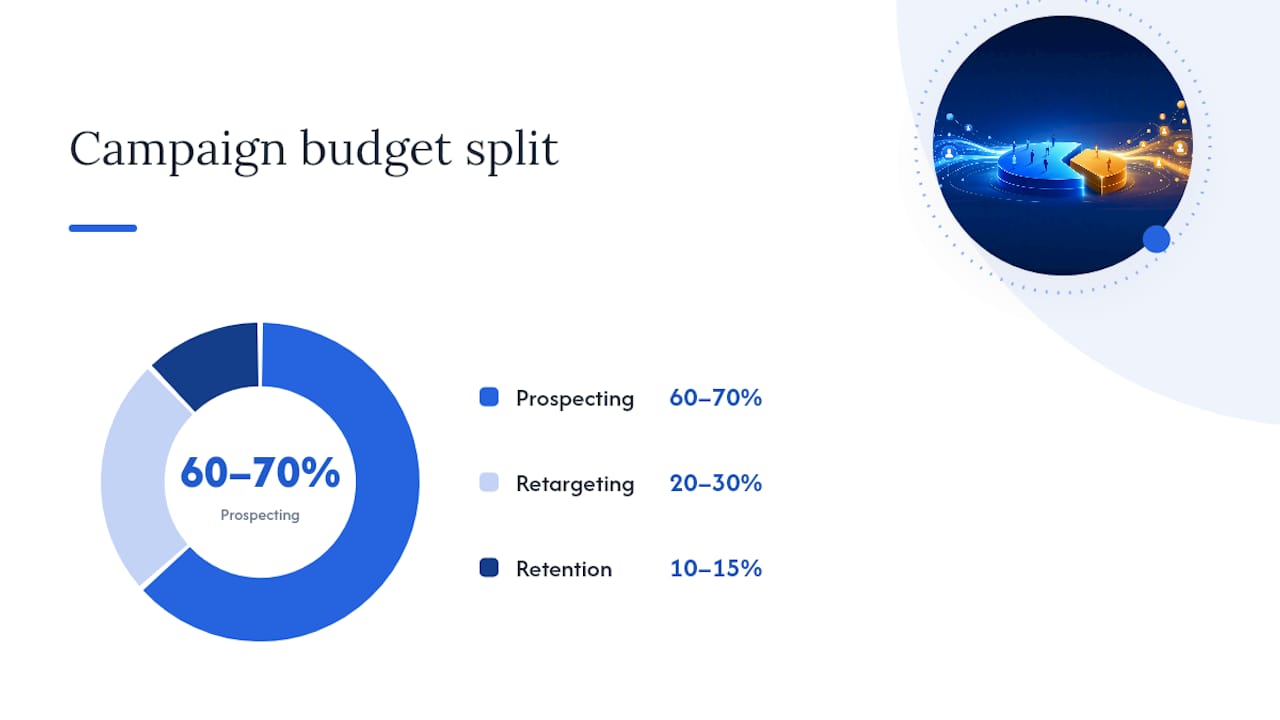
At the campaign layer, a sensible starting split looks like this: prospecting gets 60 to 70 percent of spend, retargeting gets 20 to 30 percent, and retention gets 10 to 15 percent. Prospecting needs the lion's share because it's feeding the top of your funnel, everything else downstream depends on it working.
Daily spend changes what's realistic:
- Under $20 a day: Skip broad prospecting entirely. Focus tight, narrow retargeting to people who already know you.
- $20 to $50 a day: You can test one or two audiences at most. Anything more and you're spreading crumbs.
- $50-plus a day: Now you've got enough volume to run broad or Advantage+ prospecting properly.
- $200-plus a day: Structured scale tests become viable, multiple creative variants, multiple audience cells, real statistical confidence.
Here's the mistake that quietly kills more small accounts than anything else: spreading a tiny budget across six ad sets. Each ad set needs enough conversion events to exit Meta's learning phase and optimise properly. Split $30 a day six ways and none of them ever get there. You end up with six mediocre ad sets instead of one that actually works. It's like ordering six half-portions at a restaurant instead of one proper meal, you leave hungry either way.
Statista's data on Facebook usage confirms what most SMB advertisers already sense: usage skews heavily mobile, which matters for how you allocate budget toward mobile-first creative rather than desktop-only assets.
When you do test, isolate audience as the only variable. Don't change the creative and the audience in the same test, you'll never know which one moved the needle. And always mutually exclude overlapping audiences, retargeting and prospecting cells fighting each other in the same auction just inflates your own costs. Shopify's guidance on campaign structure backs this up directly: keep prospecting, retargeting, and retention as genuinely separate layers, not a blurred mess.
Creative is the new targeting: how to test and scale what works
Old-school marketers think targeting is all dropdown menus and checkboxes. Wrong. Your creative is targeting now.
Here's the logic: Meta's algorithm reads engagement signals from your ad and uses them to decide who else to show it to. A cooking video that gets watched to completion by 35-year-old mums gets shown to more 35-year-old mums. The ad itself is doing the audience selection, whether you intended it to or not. Industry analysis backs this: the audience hook needs to sit in the first three seconds or the first line of copy, because that's what tells Meta (and the human scrolling past) exactly who this is for.
Your testing framework, step by step:
- Change one variable at a time. Visual, hook, or offer, never all three in the same test.
- Give it time. Don't judge a test until it's collected roughly 50 optimisation events. Cutting it early means you're reading noise, not signal.
- Document what won and why. A hook about "saving time" beating one about "saving money" tells you something real about your buyer.
- Scale gradually. Increase budget on the winner in steps, don't triple it overnight and shock the algorithm back into learning phase.
- Test variations of the winner, not exact copies. A new angle on a proven hook beats a lazy re-upload every time.
Mobile-first creative checklist: vertical or square ratios (skip horizontal, nobody's holding their phone sideways), text you can read at arm's length, a hook in the first three seconds, and captions short enough to digest mid-scroll.
Pro Tip: Write your ad's opening line as if you're describing the exact person you want to reach out loud. "Still doing your own bookkeeping at midnight?" does more targeting work than any interest checkbox ever will.
For a deeper breakdown of building and running these tests properly, Ads Daddy's guide on testing ad formats walks through the matrix in more detail.
Why your Facebook ad targeting stopped working (and how to fix it)
If your cost per result has crept up over the past couple of years and you can't figure out why, this is probably it: iOS privacy changes and browser restrictions quietly gutted your pixel's visibility. Meta simply can't see everything it used to.
The fix isn't complicated, but it does require actually doing it (unlike most "tips" that just tell you to "optimise more"). Here's the priority order:
- Turn on the Pixel if you somehow haven't already, this is base camp, not the summit.
- Implement Conversions API. This sends events server-side instead of relying purely on browser tracking, which dramatically improves match rates. If you're on Shopify, use the native CAPI connector rather than building it from scratch.
- Verify your domain in Business Manager so event prioritisation actually works.
- Prioritise your highest-value events (purchase, lead) when setting up event configuration, don't split your signal thin across ten low-value micro-events.
- Clean your data before uploading. Normalise phone formats, strip duplicate entries, and validate emails. A messy list matches like garbage.
If your match rates are still low after all that, check your seed list size first, tiny or scrappy lists are the usual culprit, not some mysterious Meta penalty. And if event volume looks low, check whether you're tracking the right event in the first place. Plenty of accounts are quietly optimising toward "Add to Cart" when they meant to track "Purchase."
Advanced targeting: retargeting windows, exclusions and value-based lookalikes
This is where the real margin gets made, not in fancier audiences, but in tighter sequencing.
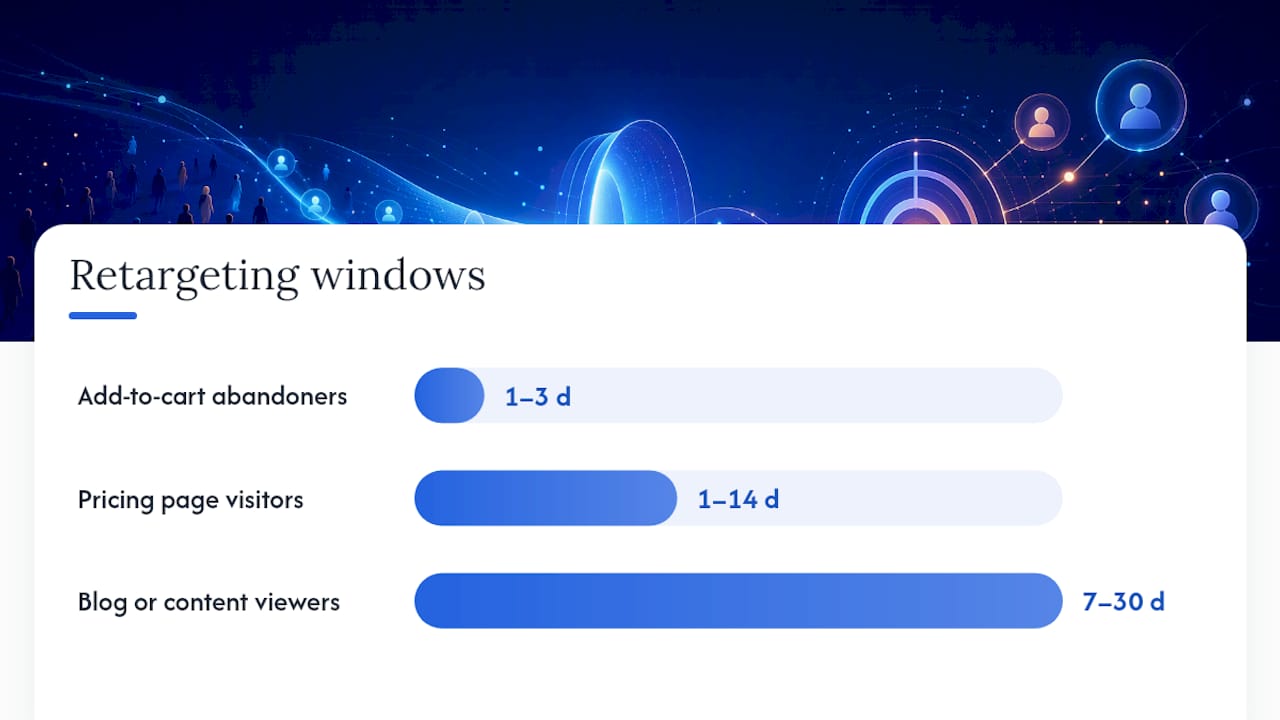
Retargeting windows should match your actual sales cycle, not a default setting. A single 180-day retargeting pool sounds thorough but usually just burns budget on people who forgot you exist. Shorter, staged windows tend to convert better:
- Add-to-cart abandoners: 1 to 3 days. These people are hot, hit them fast.
- Pricing page visitors: 1 to 14 days. Still warm, needs a slightly longer runway.
- Blog readers or top-of-funnel content viewers: 7 to 30 days. Cold-ish, needs nurturing before the pitch.
Exclusions matter as much as inclusions. Suppress existing customers from prospecting campaigns using custom-audience exclusions, and keep your test cells mutually exclusive so they're not quietly competing against each other in the same auction, which just inflates your own cost per click.
Value-based lookalikes are the upgrade most SMBs skip. Refresh that seed every 60 to 90 days as new high-value customers roll in.
A few tactical add-ons worth running: dynamic product ads for anyone who's browsed but not bought, sequential creative for cart abandoners (show the product, then a testimonial, then an offer), and if you're pushing heavy video assets, keep an eye on delivery performance on mobile data versus Wi-Fi.
| Retargeting segment | Recommended window | Why it works |
|---|---|---|
| Add-to-cart abandoners | 1 to 3 days | High intent decays fast |
| Pricing page visitors | 1 to 14 days | Warm but needs more convincing |
| Blog or content viewers | 7 to 30 days | Cold audience, needs nurturing first |
For a fuller sequencing breakdown, Ads Daddy's guide to audience retargeting covers the funnel stages in more depth. Plexo's rundown of common Meta ads mistakes is also worth a look if you want to see exactly how much budget bad exclusion hygiene burns.
What a managed Facebook ads playbook actually looks like
Here's roughly how a properly run account gets set up, stripped of the jargon.
- Audit tracking first. No point building fancy audiences on top of a broken pixel.
- Implement Conversions API so Meta gets clean, server-side signal.
- Run one Advantage+ prospecting cell alongside segmented retargeting cells, kept mutually exclusive.
- Build a creative testing cadence, one variable at a time, judged only once each cell hits real volume.
For most small businesses, the early wins show up in the first 30 to 60 days: cleaner match rates, a lower cost per result on retargeting, and a prospecting cell that finally starts converging instead of guessing. It's not instant, but it's fast enough to know within a month whether the setup is working.
If you'd rather have someone else run this checklist while you get back to running your actual business, that's a conversation for the next section.
Common mistakes and pitfalls in Facebook Ads targeting
Most targeting problems aren't exotic. They're the same five mistakes on repeat.
Over-narrowing your audience. Stacking five interests, three demographics, and a location radius until your audience count reads "800 people" isn't precision. It's starvation. Meta needs room to find converters.
Ignoring first-party data. Running Advantage+ or lookalikes off weak or missing pixel data is like asking a mate for restaurant recommendations in a city they've never visited. Feed the system real signal or don't expect real results.
Testing multiple variables at once. Changing the creative and the audience and the bid strategy in one go means you'll never know which change actually moved the number.
Judging too early. Killing an ad set after two days and $40 spent tells you nothing. Give it room to reach real optimisation volume first.
Letting audiences overlap. Running prospecting and retargeting without exclusions means you're bidding against yourself in the same auction, and paying for the privilege.
Fix these five and you'll outperform most accounts in your industry without touching a single "advanced" tactic.
Author's perspective
The biggest mistake I see SMBs make isn't picking the wrong audience type, it's narrowing so hard they starve the algorithm of room to learn, while running on a pixel that's half blind from missed Conversions API setup. Effective accounts fix the plumbing first, tracking and first-party data, before touching a single targeting checkbox. Book an audit before your next campaign, not after.
— Adrian
Get your Facebook ads targeting fixed by people who do this daily
Reading the checklist is one thing. Actually setting up Conversions API correctly, structuring three campaign layers without overlap, and running a real creative testing cadence while also running your business is another. A specialist agency can manage the Meta setup end to end, tracking, audience structure, and creative testing, so you're not burning weeks of trial and error on your own ad account.
Experienced teams handle managed Meta campaigns, Conversions API implementation, and ongoing creative testing for small and medium businesses that would rather spend their time running the business than babysitting Ads Manager. If you're an ecommerce brand, a service business, or a growing SMB that wants your targeting fixed properly rather than guessed at, this is built for you.
Book a call with Adsdaddy Australia and get your account audited before you spend another dollar on guesswork.
Sources
Meta Business guidance, Statista, Hootsuite, Shopify blog.
FAQ
Is $10 a day enough for Facebook ads?
It's enough to keep a narrow retargeting audience warm, but it won't generate enough conversion events for broad prospecting or Advantage+ to learn properly. Under $20 a day, stick to tight retargeting only.
What is the 3 2 2 method of Facebook ads?
Definitions of this framework vary across the industry and it isn't a standard Meta guideline, so treat any specific version cautiously. The safer, tested approach is the budget split covered above: roughly 60 to 70 percent prospecting, 20 to 30 percent retargeting, 10 to 15 percent retention.
How much do targeted Facebook ads cost?
Cost depends heavily on your industry, audience size, and creative quality, so there's no universal figure. What's consistent is that over-narrowed audiences and weak first-party data both drive costs up, regardless of your niche.
What is the most effective bid strategy for Facebook ads?
For most SMBs, letting Meta's automated bidding work with a clear cost or value goal outperforms manual bid caps, provided the ad set has enough budget and conversion volume to exit the learning phase. Manual bidding tends to only pay off once you have enough data to know your real target cost per result.
Should I use Advantage+ or manual detailed targeting?
Advantage+ is the better default once you have solid first-party data and conversion volume flowing, while manual detailed targeting works best as a test cell for niche B2B audiences or new accounts still building data. Adsdaddy typically runs both in parallel during the first month to see which performs better for a given account.