Audience exclusion strategy explained for digital marketers
. By Ads Daddy.

TL;DR:
- Excluding your existing customers from ad campaigns helps reduce wasted spend and improve targeting.
- Applying a three-layer exclusion system—global, prospecting versus retargeting, and funnel-stage—ensures precise audience control.
Audience exclusion stops your ads reaching people who should never see them. The single best first move? Upload your active customer list and exclude it from every acquisition campaign running right now in Google Ads and Meta Ads Manager. That one action alone can recover a meaningful slice of wasted spend by redirecting budget toward people who have never bought from you.
Exclusions are negative targeting. They tell the platform "don't show to X" rather than "show to Y." Critically, exclusions override inclusions. If someone falls into both a targeted audience and an excluded audience, the exclusion wins every time.
Three quick checks to confirm your exclusion is live:
- In Google Ads: navigate to the campaign → Audiences → Exclusions tab and confirm the list appears with a green status.
- In Meta Ads Manager: open the ad set → Audience → Exclusions and verify the Custom Audience name is listed.
- Watch your audience size estimate drop slightly after applying the exclusion. If it stays identical, the list likely hasn't populated yet.
Pro Tip: Performance Max and Meta Advantage+ handle exclusions differently from standard campaigns. Check those separately — they won't always inherit exclusions set at the ad group or ad set level.
Table of Contents
- What audience exclusion actually is (and why it overrides everything)
- The tiered exclusion framework that actually works
- Platform-by-platform setup: Google, Meta, Microsoft, and LinkedIn
- How to measure whether your exclusions are actually working
- Common mistakes that blow your budget (and how to fix them)
- Your copy-paste implementation checklist
- Key takeaways
- What Adsdaddy sees working for Australian advertisers
- Adsdaddy helps you implement exclusions the right way
- Useful resources to go deeper
- FAQ
What audience exclusion actually is (and why it overrides everything)
Audience exclusion is the practice of preventing a defined group of people from seeing your ads. It's the "do not disturb" list for your campaigns. Where positive targeting says "find me people like this," exclusion says "skip anyone who looks like that."

The override mechanic matters. Ad platforms resolve targeting conflicts by giving exclusions priority. A user who matches your lookalike audience AND your past-purchaser exclusion list will not see the ad. Full stop.
Here's a classic example. You're running app install ads to drive new downloads. Without exclusions, the algorithm happily serves those ads to people who already have the app installed. You're paying to acquire someone you already have. Fixing it takes two minutes: create a Custom Audience of current app users and exclude them from the install campaign.
Exclusions can be applied at different levels depending on the platform:
- Campaign level — affects every ad group or ad set within that campaign.
- Ad group / ad set level — more surgical; targets one specific audience segment.
- Account level — available in some platforms (notably Meta for Advantage+ campaigns) to apply a master exclusion across all campaigns.
The tiered exclusion framework that actually works
Think of this as three floors of a building. Each floor does a different job. You need all three.
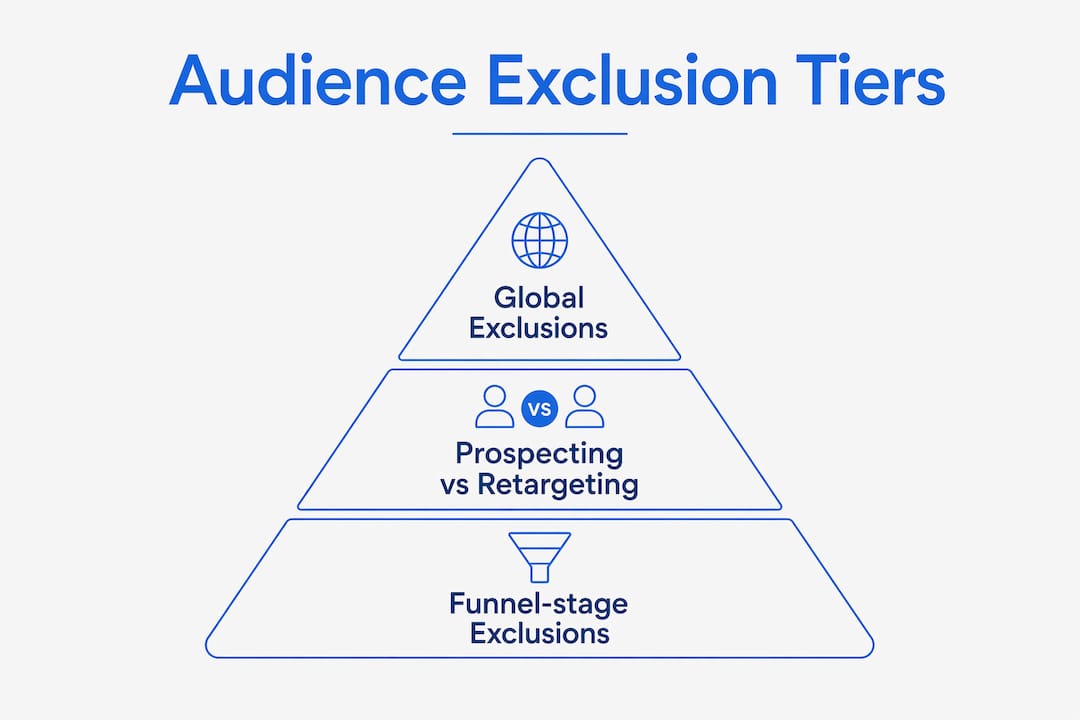
Layer 1: Global exclusions (the ground floor)
These apply across every campaign in your account. Past purchasers, active subscribers, current customers — anyone who has already converted. The goal is simple: stop paying acquisition costs for people you already own.
Build a master exclusion list. Name it clearly: [MASTER] Active Customers — 180d. Upload it to every platform. Refresh it at least monthly.
Layer 2: Prospecting vs retargeting separation (the first floor)
Your prospecting campaigns and retargeting campaigns should never cannibalise each other. Exclude your retargeting audiences from prospecting, and exclude cold audiences from retargeting. This prevents internal bidding wars where your own ad sets compete for the same person, driving up your own CPM.
Layer 3: Funnel-stage and offer-specific exclusions (the top floor)
Someone who just downloaded your lead magnet shouldn't see the top-of-funnel awareness ad anymore. Someone who abandoned checkout needs a different message than someone browsing a category page. Align your marketing funnel stages with exclusion logic so each campaign speaks to exactly the right moment.
Implementation steps:
- Audit your current audience lists and identify which ones represent converted or in-funnel users.
- Create a master exclusion list and a separate list per funnel stage.
- Apply Layer 1 globally across all acquisition campaigns.
- Apply Layer 2 by excluding your retargeting pool from prospecting campaigns and vice versa.
- Apply Layer 3 at the ad set or ad group level for offer-specific campaigns.
- Set a refresh cadence (see table below) and assign one person as list owner.
- Document every list name, source, and refresh date in a shared sheet.
Lookback window guide:
| Audience type | Recommended lookback | Refresh cadence |
|---|---|---|
| Active customers / recent purchasers | 30–180 days | Monthly |
| Website visitors (all pages) | 30–60 days | Fortnightly |
| Abandoned cart / checkout | 7 days | Weekly |
| Lead magnet downloaders | 30–90 days | Monthly |
| App users (active) | 30–180 days | Monthly |
Naming convention example: [EXCL] Past Purchasers — 90d — AU — [Platform]
Pro Tip: Don't over-exclude. If your exclusion lists cover the majority of your addressable audience, automated campaigns like Performance Max and Advantage+ lose the signal they need to learn and scale. Keep exclusions precise. Exclude confirmed customers and clear non-converters, not broad interest groups.
Platform-by-platform setup: Google, Meta, Microsoft, and LinkedIn
Every platform has its own quirks. Here's where to go and what to watch for.
Platform exclusion map:
| Platform | Exclusion level | Key method | Main caveat |
|---|---|---|---|
| Google Ads | Campaign or ad group | Audience segments, Customer Match | Performance Max has limited exclusion support |
| Meta Ads Manager | Ad set or account | Custom Audiences | Advantage+ restricts ad-set exclusions |
| Microsoft Advertising | Campaign or ad group | Customer Match, remarketing lists | Smaller audience pools in AU |
| LinkedIn Ads | Campaign | Matched Audiences, company/contact lists | Minimum audience size of 300 members |
Google Ads
Go to your campaign → Audiences → Exclusions → click the pencil icon to add a segment. You can exclude at campaign level (affects all ad groups) or drill down to a specific ad group.
Customer Match lets you upload a hashed CSV of emails. Google recommends observing segment performance before excluding — use the "Observation" setting first to gather data, then switch to exclusion once you're confident.
Performance Max caveat: PMax doesn't support ad group level exclusions. You can apply audience exclusions at the campaign level, but the algorithm still has significant autonomy. For brand safety, use account-level negative keywords and placement exclusions alongside audience exclusions. Check the improving ad performance guide for more on managing automated campaign types.
Meta Ads Manager
Navigate to your ad set → Audience → scroll to Exclusions → add your Custom Audience. This is now the primary exclusion method since Meta removed Detailed Targeting Exclusions.
Advantage+ caveat: Meta's Advantage+ campaigns limit what you can exclude at the ad set level. For these campaigns, use account-level controls. Go to Ads Manager → Account Overview → Audience Controls to set exclusions that apply across all Advantage+ campaigns. This is non-optional if you're running Advantage+ Shopping Campaigns.
Pro Tip: Run the "Show Overlap" tool in Meta Ads Manager before adding exclusions. If two ad sets share a high level of audience overlap, they're almost certainly bidding against each other. Fix the overlap first, then apply exclusions.
Microsoft Advertising
Exclusions in Microsoft Advertising sit at the campaign or ad group level, similar to Google Ads. Go to Campaigns → select your campaign → Audiences → Exclusions. Customer Match works here too, using hashed email uploads. Australian audience pools on Microsoft are smaller than Google's, so be careful not to exclude so aggressively that delivery collapses.
LinkedIn Ads
In LinkedIn Campaign Manager, go to your campaign → Audiences → add a Matched Audience under Exclusions. You can exclude by contact list, company list, or retargeting audience. The minimum audience size is 300 members, so tiny lists won't apply. LinkedIn is particularly useful for excluding existing clients from lead generation campaigns targeting new accounts.
Automation note: API-driven or server-side list uploads (via CRM integrations or CDPs) can have a 24–72 hour delay before the audience populates. Don't panic if exclusions don't appear to apply immediately. Check membership counts before assuming something's broken.
How to measure whether your exclusions are actually working
Applying exclusions without measuring them is like changing your diet and never stepping on the scales. Here's what to track.
Key metrics to watch:
- New-customer CAC — if exclusions are working, acquisition cost for genuinely new customers should stabilise or drop.
- ROAS — overall return should improve as budget shifts away from wasted impressions.
- Frequency — if frequency drops after applying exclusions, you've successfully stopped hammering the same people.
- Audience overlap % — use Meta's Show Overlap tool and Google's Audience Overlap report to quantify internal competition.
- Impression share and delivery — a sudden drop in delivery can mean over-exclusion. Watch this closely in the first 48–72 hours.
Testing protocol: Run a holdout test where possible. Split your campaign budget, apply exclusions to one group and leave the other unchanged for 2–4 weeks. Compare new-customer CAC and ROAS between groups. This gives you clean, incremental data rather than correlation.
Validation checklist:
- Confirm the exclusion list appears in the campaign's Audiences → Exclusions tab.
- Check audience membership count. A list showing zero members hasn't populated yet.
- Verify the exclusion is applied at the correct level (campaign vs ad set).
- Cross-reference delivery data: if impressions dropped significantly, check whether the excluded audience was too large.
Traceability tip: Log every list upload in a shared doc. Record who uploaded it, when, what source file was used, and which campaigns it was applied to. This makes audits fast and keeps your team accountable. Good ad targeting strategies always have a paper trail.
Pro Tip: Don't judge exclusion impact in the first 48 hours. Automated campaigns need time to re-optimise after any audience change. Give it at least 5–7 days before drawing conclusions.
Common mistakes that blow your budget (and how to fix them)
Over-excluding and starving the algorithm
If your exclusion lists cover the majority of your addressable audience, machine learning has nothing to work with. Performance Max and Advantage+ are particularly sensitive to this. Keep exclusions precise. Exclude confirmed customers and clear non-converters, not broad interest groups.
Forgetting to refresh lists
A customer list uploaded six months ago is stale. New customers aren't on it. Old exclusions may have expired. Set a calendar reminder to refresh every 30 days at minimum.
Applying exclusions at the wrong level
Excluding at the ad group level when you meant campaign level (or vice versa) is a silent killer. The exclusion looks applied, but it's not doing what you think. Always double-check the level in the UI.
Tiny audience sizes causing delivery issues
LinkedIn needs 300 members. Google and Meta have their own minimums. A list with 50 emails won't apply. Combine small lists or expand the source data.
Red flags to watch:
- CAC spikes suddenly after a campaign change.
- Delivery drops to near zero.
- Audience overlap above 30% between two active ad sets.
- Frequency climbing past 5–7 on Meta without a corresponding lift in conversions.
Quick fix checklist when delivery stops:
- Check audience membership count — is the list populated?
- Check lookback window — has it expired?
- Check campaign vs ad set level application.
- Check automation settings — is Performance Max or Advantage+ overriding your exclusion?
- Temporarily remove the exclusion and monitor delivery. If it recovers, the exclusion was too broad.
Also remember: make purchase-based exclusions time-bound. A customer who bought 12 months ago might be ready to buy again. Permanent exclusions for temporary behaviours waste re-activation opportunities. Align expiry with your product's repurchase cycle.
Your copy-paste implementation checklist
Use this in your next campaign brief. Paste it in, fill the blanks, ship it.
- Create master exclusion lists — past purchasers (30d, 90d, 180d), active customers, current subscribers.
- Name them consistently — format:
[EXCL] [Audience Type] — [Lookback] — [Market] — [Platform]. - Upload source files — hashed CSV from CRM or CDP export. Record file name, date, and uploader.
- Apply Layer 1 globally — add master customer exclusion to every acquisition campaign across Google Ads, Meta, Microsoft, and LinkedIn.
- Apply Layer 2 — exclude retargeting audiences from prospecting campaigns; exclude cold audiences from retargeting.
- Apply Layer 3 — add funnel-stage exclusions at the ad set or ad group level for offer-specific campaigns.
- Verify membership counts — confirm each list shows active members before launching.
- Run a holdout test — split budget and measure new-customer CAC and ROAS over 2–4 weeks.
- Set refresh cadence — monthly for customer lists, fortnightly for website visitors, weekly for abandoned cart.
- Assign a list owner — one person approves all changes and maintains the master log.
Brief artefacts to attach: CSV sample (anonymised), list owner name, refresh frequency, lookback windows per list, and platform-specific upload confirmation screenshots.
Key takeaways
A well-executed audience exclusion strategy recovers wasted ad spend, prevents internal bidding wars, and keeps automated campaigns like Performance Max and Advantage+ focused on genuine new customers.
| Point | Details |
|---|---|
| Exclusions override inclusions | If a user matches both a targeted and an excluded audience, the exclusion always wins. |
| Three-layer framework | Apply global customer exclusions, separate prospecting from retargeting, then add funnel-stage exclusions. |
| Platform caveats matter | Performance Max and Advantage+ require campaign-level or account-level exclusions — ad set exclusions won't always apply. |
| Refresh lists regularly | Stale lists miss new customers; refresh customer lists monthly and abandoned-cart lists weekly. |
| Adsdaddy can implement this | Adsdaddy audits exclusion gaps, builds cross-platform lists, and manages ongoing refresh for Australian advertisers. |
What Adsdaddy sees working for Australian advertisers
Here's an opinion that might sting a little: most Australian advertisers treat exclusions as a one-time setup task. They upload a customer list on day one, never refresh it, and wonder why their new-customer CAC keeps creeping up six months later.
The shift happening right now is that automation is doing more of the targeting work. Performance Max and Advantage+ are genuinely good at finding converters. The problem is they'll happily re-convert your existing customers and count it as a win. Your ROAS looks great. Your actual new-customer acquisition is quietly stalling.
The marketers winning in 2026 are the ones who treat exclusions as a primary control, not an afterthought. They have a centralised exclusion list, a named list owner, a monthly refresh in the calendar, and a holdout test running at all times. That's not complicated. It's just disciplined.
For Aussie advertisers specifically, the smaller market size makes this even more critical. Australia's addressable digital audience is a fraction of the US or UK. You can't afford to waste impressions on people who already know you. Every dollar spent re-targeting an existing customer is a dollar not spent finding a new one. Understanding why you should target specific audiences is the foundation, but exclusions are what make that targeting precise.
The other thing worth saying: cross-platform synchronisation is underused. Most teams manage exclusion lists separately per platform. A customer who converted via Google Ads is still getting hammered on Meta. A centralised list, exported from your CRM and uploaded to every platform simultaneously, solves this in one step.
Adsdaddy helps you implement exclusions the right way
Knowing the framework is one thing. Having someone who's done it across dozens of Australian accounts is another.

Adsdaddy runs a focused exclusion audit — typically 30–60 minutes — that identifies exactly where your budget is leaking to existing customers, overlapping audiences, and stale lists. From there, the team builds your master exclusion lists, applies them across Google Ads, Meta, Microsoft Advertising, and LinkedIn, and sets up a refresh schedule so nothing goes stale. You get a remediation plan, implementation, and ongoing monitoring. No guesswork, no "set and forget."
If you're running Performance Max or Advantage+ campaigns and haven't configured account-level exclusions yet, that's the first thing Adsdaddy fixes. It's one of the fastest wins available in any Australian ad account right now.
Ready to stop paying to re-acquire customers you already have? Book an audit with Adsdaddy and get a clear picture of where your exclusion gaps are.
Useful resources to go deeper
These are the official docs and practitioner resources worth bookmarking:
- Google Ads Help — Audience Exclusions: The canonical reference for adding exclusions at campaign and ad group level, including Customer Match setup and the observation vs targeting distinction.
- Google Ads Help — App Campaign Exclusions: Covers the campaign-level-only limitation for App campaigns and how to create exclusion segments before applying them.
- Meta Business Help Centre — Custom Audiences: Official guidance on creating and applying Custom Audiences as exclusions at the ad set level, and where to find account-level Advantage+ controls.
- Microsoft Advertising Help — Audience Exclusions: Step-by-step for applying Customer Match and remarketing exclusions in Microsoft Advertising campaigns.
- LinkedIn Marketing Solutions — Matched Audiences: Covers contact list and company list exclusions, minimum size requirements, and how to upload lists via Campaign Manager.
- Audience targeting explained: Practitioner overview of audience targeting and segmentation that pairs well with exclusion strategy planning.
- Unlocking audience needs: Useful background on identifying which audience segments to prioritise before building exclusion lists.
FAQ
What is audience exclusion in digital advertising?
Audience exclusion is negative targeting that prevents a defined group of people from seeing your ads. It overrides positive targeting, so if someone matches both an included and an excluded audience, they won't see the ad.
Which strategy best prevents overlapping audiences?
Apply a three-layer exclusion framework: exclude all past purchasers globally, separate prospecting from retargeting audiences, and add funnel-stage exclusions at the ad set level. Use Meta's Show Overlap tool and Google's Audience Overlap report to quantify and fix internal competition before it inflates your CPM.
How do you exclude an audience in Google Ads and Meta?
In Google Ads, go to the campaign → Audiences → Exclusions and add your segment. In Meta Ads Manager, open the ad set → Audience → Exclusions and select your Custom Audience. For Advantage+ campaigns on Meta, set exclusions at the account level via Audience Controls instead.
What is a good audience strategy for acquisition campaigns?
Exclude existing customers and active subscribers from all acquisition campaigns, separate your prospecting and retargeting pools so they don't compete, and align lookback windows with your product's repurchase cycle. Adsdaddy recommends treating this as a live system with monthly list refreshes, not a one-time setup.
Does Performance Max support audience exclusions?
Performance Max supports audience exclusions at the campaign level only, not at the ad group level. The algorithm retains significant autonomy, so pair audience exclusions with account-level negative keywords and placement exclusions for the most control.